Events and Event Actions
What are Events?
Events are conditional triggers built in the Event Manager Database.
How Events Work
Each event continuously monitors a panel condition. When a condition is met, the Event executes associated actions.
-
Define a Trigger: configure the Event Trigger Condition(s). See Event Trigger Condition Types below.
-
Attach Actions: associate up to 16 actions with a single event. See more about Actions below.
-
Monitor & Manage: All events are visible in the Event Manager Database, where you can add, edit, delete, copy/paste, reorder, and import or export the entire database. See Manage Events for more information.
Event Triggers
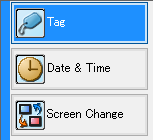
Event Trigger Condition Types
Conditional triggers for events are based on:
-
Tag state or tag value
-
Discrete type tags: trigger an action when a tag changes state
-
Numeric type tags: trigger an action based on a tag value condition
-
-
A single event at a specific Day & Time
-
Daily
-
Specific days of the week
-
Multiple times per day at a set interval during a time frame
-
-
When a set Screen opens or closes.
What are Actions?
Actions are what Events do. Events act as triggers for actions.
How Actions Work
Each event continuously monitors a panel condition. When a condition is met, the Event executes up to 16 Actions.
Actions execute in the order they appear in the Sequence List. Reorder them with the up/down arrows.

There are 11 Actions. See each one below for more information:
For more information, see Manage Event Actions.
 Related Topics
CM137