Remote Access Security Best Practices
Use the following best practices in conjunction with security standards at your C-more installation site.
Attack methods become more sophisticated every day. Consider network security at every C-more panel installation. New mitigation procedures and technology are continually becoming available.
The following are the minimum requirements to protect the C-more installation, the process, and connected equipment.
Project Protection
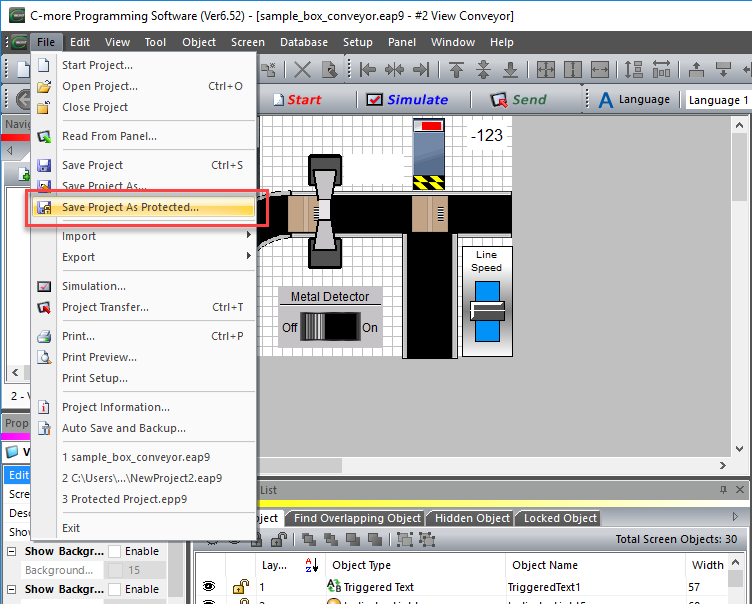
Save any remotely accessible C-more panel as a Protected Project. When you save a project as a Protected Project, the C-more programming software cannot edit it again, and the panel cannot read it from C-more. If any network security provision fails, the project is not compromised by a malicious user. Create two backups for every version and store them in two separate locations.
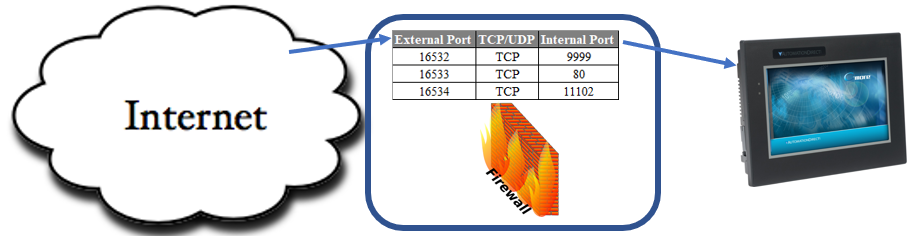
Exposure of C-more TCP and UDP Port Numbers
Port Forwarding is no longer recommended because it exposes applications to malicious access. A Virtual Private Network (VPN) is more secure for remote access.
If you must expose application ports, consider using uncommon external port numbers that redirect to the correct port numbers in the router's port forwarding table. This makes ‘fingerprinting’ C-more panels on the Internet very difficult.
Security Appliances
Use a VPN router to remotely access factory automation products such as C-more panels and PLCs. This prevents exposing application ports directly on the Internet and adds the security of an encrypted tunnel for all communications. VPN technology has progressed tremendously and is readily available in a variety of form factors, including industrial hardware that can be DIN rail-mounted.
Latest Firmware Version
Always update to the latest C-more panel firmware version to protect against security attacks. The further behind a product is on updates, the less protection the product has.
Verify the C-more panel Firmware Version
You must have C-more programming software and C-more panel firmware Version 2.4 or later to use Remote Access. If your panel has an earlier version of firmware, Update Firmware locally. The FAQ Help File topic section on Firmware Frequently Asked Questions (FAQ) describes how to display the panel firmware version.
If you upgrade from a version prior to Version 2.4, reset to factory default with the panel System Setup after the firmware update is complete. The HTML files need to reset to add the Remote Access link.
Reset the panel using the panel setup screen.
 Back up Your Custom Index File
| Note: | To keep your custom index file, back up prior to resetting factory defaults or the index file is deleted. You cannot get it back without a backup. |
-
Save your index.htm file.
-
Reset to factory defaults.
-
Copy the new index.htm file.
-
Merge the functions from your custom index.htm into the newly installed index.htm with Remote Access.
See the C-more Hardware User Manual for assistance with a factory default reset.
| Note: | Sign up for software update notifications at https://support.automationdirect.com/downloads.html#notificationform. |
Personnel Access
Only give passwords for C-more applications such as FTP, HTTP, and Remote Access to trusted individuals. Remove or change them if those individuals leave the company.
Defense in Depth
Security Considerations for Control Systems Networks
Always use defense in depth practices for factory automation products accessible on the Internet.
Integration Challenges
Manufacturers integrate automation and control systems within their plants to stay competitive. This often means connecting systems to upstream enterprise data systems and allowing access to information across multiple plants or through the Internet. This convergence of IT and automation creates challenges in maintaining secure systems and protecting investments in processes, personnel, data, and intellectual property.
Recommended Security Measures
While automation networks and systems have built-in password protection schemes, this is only one step toward securing systems. Automation control system networks need to incorporate data protection and security measures at least as robust as a typical business computer system. AutomationDirect recommends that users of PLCs, HMI products, and SCADA systems perform their own network security analysis to determine the proper level of security for their application. However, the Department of Homeland Security’s National Cyber-security and Communications Integration Center (NCCIC) and Industrial Control Systems Cyber-Emergency Response Team (ICS-CERT) provide guidance on network security and safety under an approach described as "Defense in Depth”, published at https://www.us-cert.gov/sites/default/files/recommended_practices/NCCIC_ICS-CERT_Defense_in_Depth_2016_S508C.pdf
This comprehensive security strategy involves physical, process, and policy protection methods. It creates multiple layers of security for industrial automation systems. Safeguards include firewalls, isolation from business networks, intrusion detection systems, and secure remote access methods such as VPNs. Minimize network exposure for all control system devices. These systems should not directly face the Internet. Following these procedures significantly reduces risks from external and internal sources.
Your Responsibility
Users are responsible for protecting their systems. AutomationDirect recommends using one or more of the following resources when building a secure system:
-
ICS-CERT Control Systems recommended practices: https://ics-cert.us-cert.gov/Recommended-Practices
-
Special Publication 800-82 of the National Institute of Standards and Technology – Guide to Industrial Control Systems (ICS) Security: https://csrc.nist.gov/publications/detail/sp/800-82/rev-2/final
-
ISA99, Industrial Automation and Control Systems Security https://www.isa.org/isa99/ (This is a summary; these standards must be purchased from ISA).
The above set of resources provides a comprehensive approach to securing a control system network and reducing risk and exposure from security breaches. Given the nature of any system that accesses the internet, each user is responsible for assessing the needs and requirements of their application and taking steps to mitigate security risks in their control system.
The latest version of the document above can be found at this link: https://support.automationdirect.com/docs/securityconsiderations.pdf
CM528