Export Recipe Sheet
Export a recipe sheet to use it in other projects. The C-more programming software provides two ways to export a recipe sheet: from the File menu, or from the Recipe Database.
| Note: | Exported recipe sheets are saved as a Unicode text format file with a .csv extension. You can edit exported recipe sheets in Microsoft® Excel®™. See Edit Recipe Sheets with Excel®™ for details. |
Export a Recipe Sheet with File Menu
-
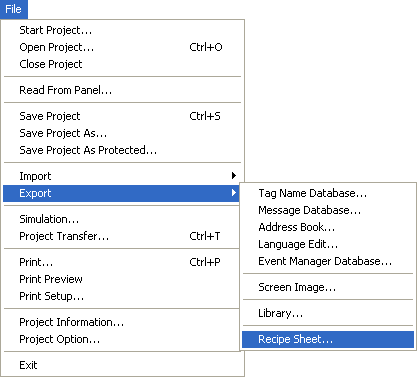
From the File menu, select Export, Recipe Sheet.
-
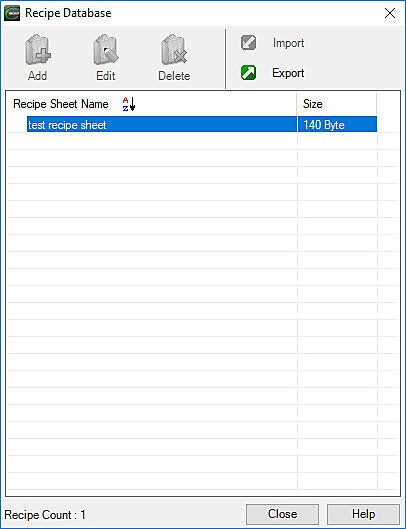
The Recipe Database window opens with the Recipe Sheet List.
-
Select the recipe sheet to export and click Export.
-
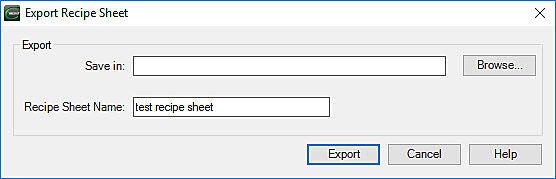
The Export Recipe Sheet window opens.
-
Browse to the location where you want to save the file.
-
Click Export.
Export a Recipe Sheet with Recipe Sheet Menus
-
Open the Recipe Database and select the recipe sheet to export.
-
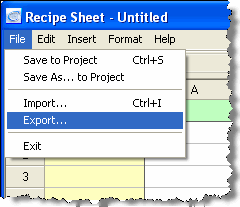
In the Recipe Sheet window, select File, Export.
-
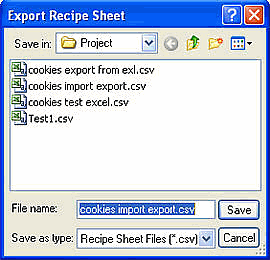
The Export Recipe Sheet window opens.
-
Select the export location. You can change the file name, but do not change or delete the .csv extension.
-
Click Save.
-
The Export Recipe Sheet window closes and the recipe sheet remains open.
 Related Topics
CM460