Project Storage/Boot Location
Sets both the storage location and the boot location for the panel. Both locations always match.
Available locations are:
-
Panel Built-in Flash
-
SD1
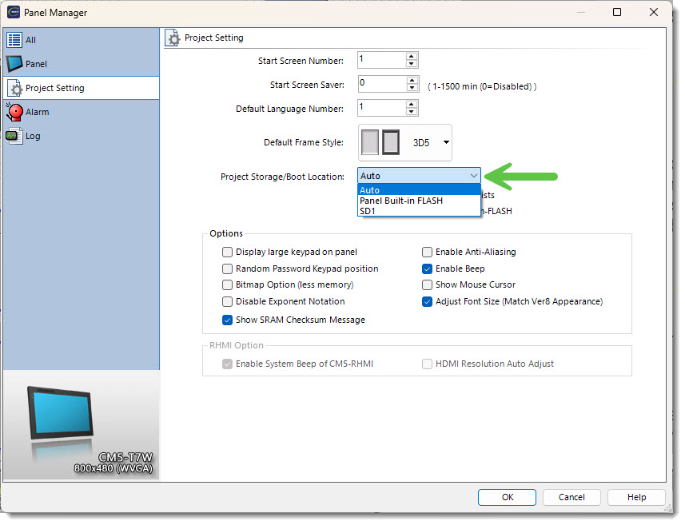
Auto
The primary Boot and download device is SD1.
With an SD card installed, Auto sets the Storage and Boot location there automatically, even if there is not a project stored on the SD card.
Boot
If an SD card is not installed in the SD1 slot, the panel boots from the Built-in-FLASH memory.
If there is no project on the SD card or the Built-in-FLASH, the panel displays "NO USER PROGRAM".
Storage
With an SD card is installed in the SD1 slot , when the software sends a project, it downloads to the SD card.
If there is a project in the SD card, the project is clears, which deletes the existing project and overwrites it with the new one.
If an SD card is not installed in the SD1 slot, the project downloads to the Built-in-FLASH.
Panel Built-in-FLASH
The primary Boot and download device is the Built-in-FLASH, no matter if there is an SD card installed in the SD1 slot.
Boot
If there is no project i in the Built-in-FLASH, the panel displays "NO USER PROGRAM".
Storage
If there is a project in the Built-in-FLASH, the project is clears, which deletes the existing project and overwrites it with the new one.
SD1
The primary Boot and download device is SD1.
Boot
If there is no project on the SD card,the panel displays "NO USER PROGRAM".
Storage
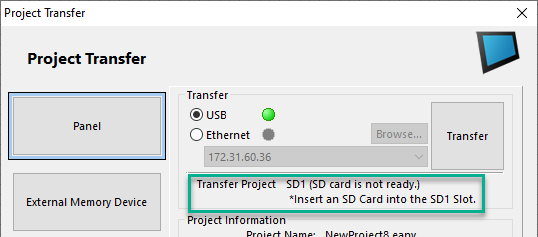
If there is no SD card present, you cannot transfer the project. The Transfer button is grayed out and if there is a project in the Built-inFLASH, it deletes.
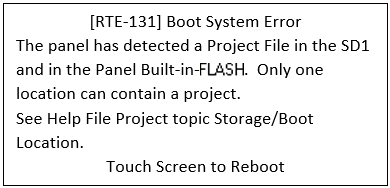
| Note: | If you set the project to Auto, a project cannot reside in both the Built-in-FLASH and the SD card. An error RTE-130 occurs on the panel on reboot. You must remove the project from one of the storage media before the panel can run. |
Select the correct storage location before you transfer the project to the panel to clear the project from the non-target location.
CM302