Allen-Bradley Control/CompactLogix Tags
The ControlLogix, CompactLogix, and FlexLogic PLCs are tag-based PLC architectures and do not have PLC addressing like the SLC and MicroLogix series.
There are five main types of tags:
 Atomic Tags
Atomic tags are the simplest tag type in a Control/CompactLogix system: single values such as a BOOL, DINT, or REAL: that serve as the building blocks for more complex tag structures like UDTs and arrays.
-
BOOL
-
SINT
-
INT
-
DINT
-
REAL
The syntax for Atomic data type is the tag name itself with no precursors or delimiters. You can address all Atomic data types in the C-moreprogramming software. You can import them with L5K or L5X file.
Atomic Tag Examples:
| Tag Name | Type | Description |
|---|---|---|
| THIS_IS_A_BOOL_TAG | BOOL | Single Bit |
| THIS_IS_A_SINT_TAG | SINT | Byte or Short Integer |
| THIS_IS_A_INT_TAG | INT | Single Word Single Integer |
| THIS_IS_A_DINT_TAG | DINT | Double Word Signed Integer |
| THIS_IS_A_REAL_TAG | REAL | Double Word Float |
Pre-defined Structures Tags
Pre-defined data types are complex and made up of one or more Atomic data types, Arrays, or other pre-defined data types. They are commonly called “Structures” in other programming languages, such as C. Pre-defined data types already exist in RS Logix 5000 with every new project you create.
Structures include:
-
Timers
-
Controls
-
Counters
-
Strings
-
Any grouping of different data types that function as a single unit and serve a specific purpose predefined in the software
Pre-Defined Structure Examples:
| Tag Name | Type | Tag Description |
|---|---|---|
| TIMER_TAG.DN | BOOL | A "timer done" member of a TIMER structure. |
| TIMER_TAG.ACC | DINT | A "timer accumulated time" member of a TIMER structure. |
| STRING_TAG.DATA | STRING | The actual string Data member of a STRING structure. |
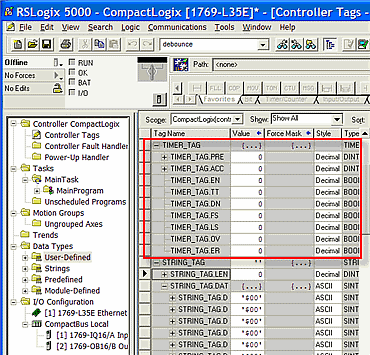
There are hundreds of pre-defined data types available in the RS Logix 5000 software.
You can address all pre-defined data types in the C-more programming software.
You can import pre-defined data types with the L5K or L5X file.
The L5KPreDefine.txt or L5XPreDefine.txt document is located in Documents\AutomationDirect\C-more\Setting.
-
This folder must contain the data types you want to import.
Array Tags
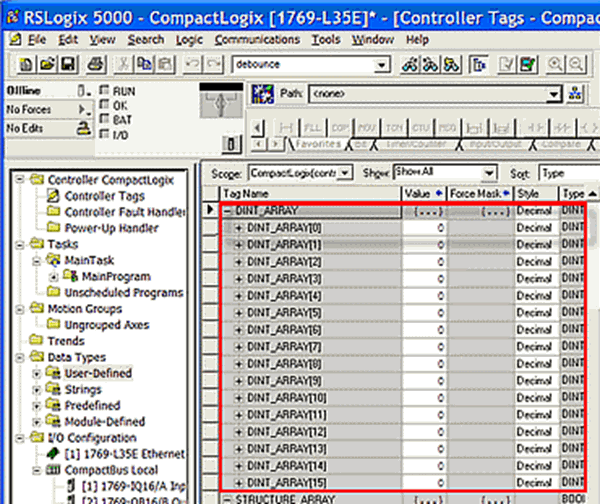
Array tags are a data structure of a sequential set of the same data type. Each element has an index number. You can create Arrays from Atomic data types or complex data types (pre-defined or user-defined). You can address all Array tags in the C-more programming software. You can import Array tags (depending upon what data type array) with the L5K or L5X file. Adjust the Import Array Element Count Limit field in the C-more programming software import window to limit the number of import elements.
Array Tag Examples:
| Tag Name | Type | Tag Description |
|---|---|---|
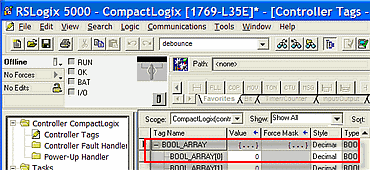
| BOOL_ARRAY[0] | BOOL | The first element of a BOOL array |
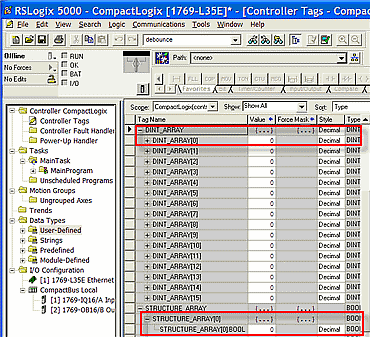
| DINT_ARRAY[10] | DINT | The 11th element of a DINT array |
| STRUCTURE_ARRAY[0].BOOL | BOOL | A BOOL member of an array of structures |
User-Defined Tags
User-Defined Data Types (UDTs) are custom tag structures to group related data members into a single reusable type. Similar to ControlLogix built-in predefined data types, UDTs allow you to define exactly which data types each member holds. UDTs are accessible across the ControlLogix system and imported into your project using an L5K or L5X file, depending on the members defined within the structure.
User-Defined Tag Examples:
-
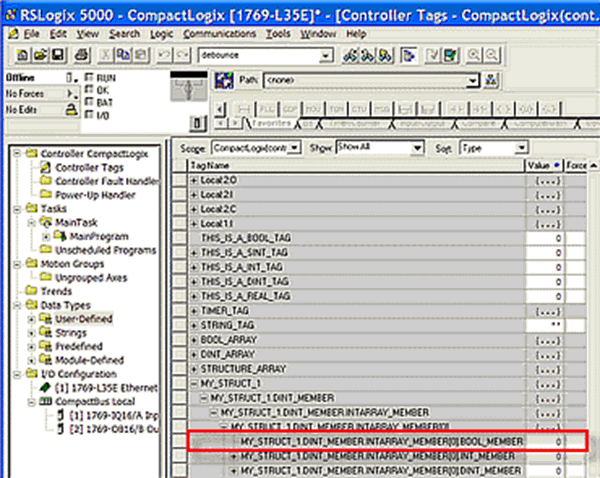
MY_STRUCT_1.DINT_MEMBER.INTARRAY_MEMBER[0].BOOL_MEMBER is a BOOL member of INTARRAY_MEMBER which is a INT member of a DINT member of the MY_STRUCT data type you create.
Add-On Instructions
Add-On Instructions (AOIs) allow you to package reusable logic into a single, self-contained instruction to call throughout your ControlLogix program. AOI parameters work similarly to UDT members: when an AOI is assigned as a controller or program scope tag, its parameters become the tag structure members, letting you access inputs, outputs, and internal data through a consistent, organized structure.
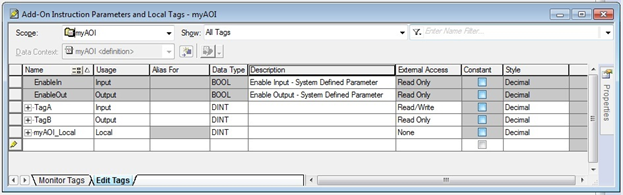
Here are the definitions for AOI Parameters local tags.
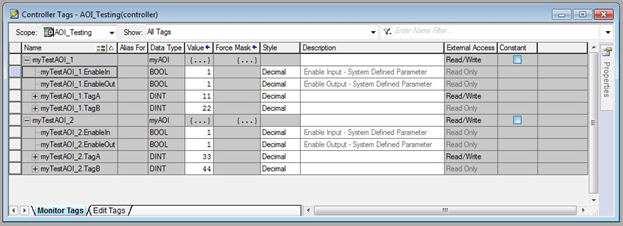
Here are controller scope AOI tags. Notice that the AOI local tags are not available. Only input and output tags are available at the controller or program scope. Additionally, for C-more access, you must mark those tags with “Read/Write” or “Read Only” external access permission.
| Note: | Import for Add-On Instruction is only supported using the L5X (not L5K). See Import Tags. |
Enter Tags
You can enter tags in the C-more Programming Software one of two ways:
Import Tags
Import the L5K or L5X file from RSLogix 5000.
Newer L5X file format allows C-more to import I/O module tags directly. You can customize a configuration file to reduce the number of I/O module tags, which import automatically. By default, all I/O Module tags import, which may create a large number of unnecessary tags. To disable automatic import for a group of Module tags, change the value from 1 to 0.
The configuration file is at this path: \Documents\AutomationDirect\C-more\Setting\L5XPreDefine.txt
The available options are:
-
ModuleIO_Include_Local=1
-
ModuleIO_Include_Remote=1
-
ModuleIO_Include_Inputs=1
-
ModuleIO_Include_Outputs=1
-
ModuleIO_Include_Config=1
-
ModuleIO_Include_Status=1
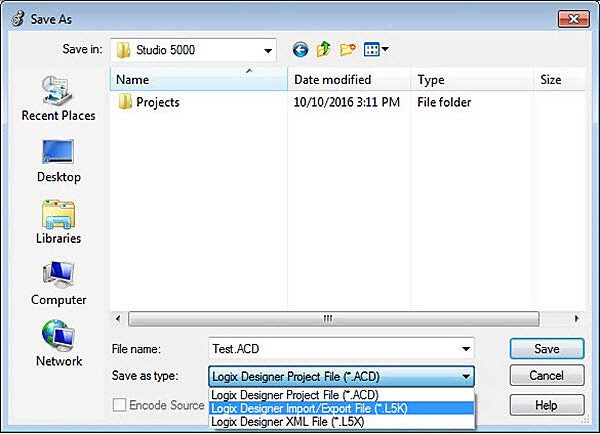
The C-more programming software imports both controller scope and program scope tags. In RSLogix 5000, you can save the project as an .L5K or .L5X extension with Save As and choose L5K or L5X at the bottom of the Save As Type drop-down menu.
-
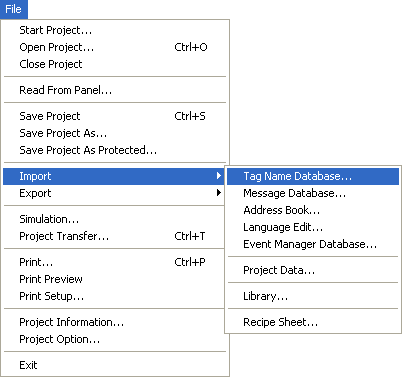
From the Main menu select File.
-
The File drop-down menu opens.
-
The Import Tag Name Database window opens.
-
In the File Path field, click the drop-down arrow and choose your .L5K file.
-
Click Import.
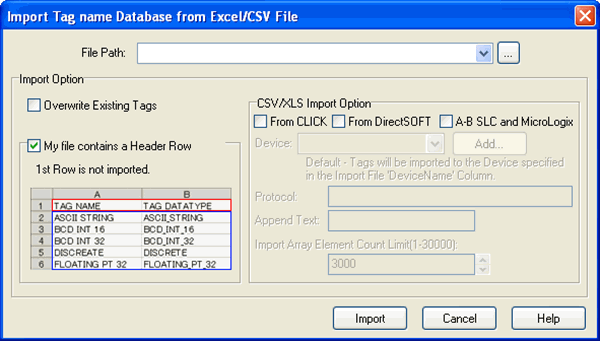
If you have multiple PLCs in your C-more programming software project, you can choose where to import the tags. You can also choose text to append to the end of each tag if you import multiple projects with the same tag names. See Import Control/CompactLogix Predefined Data Types
-
C-more programming software supports the following tag types directly from a ControlLogix RSLogix 5000 .L5K or .L5X file:
Atomic tags
TIMER
COUNTER
STRING
UDTs made up of those types
| Note: | For all other predefined data types: or UDTs built from predefined types other than TIMER, COUNTER, or STRING: see Import Control/CompactLogix Predefined Data Types. |
Manually Add a Tag
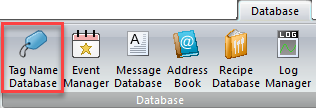
You can manually add any type of tag to C-more from the Database tab.
-
Select Tag Name Database.
-
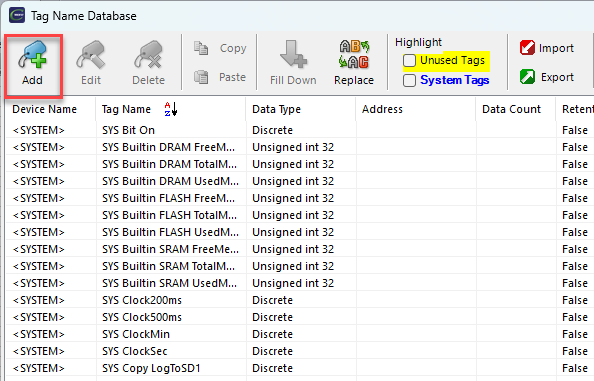
The Tag-Name Database window opens.
-
Click the Add button on the lower left portion of the window.
-
The Tag Name-Add window opens.
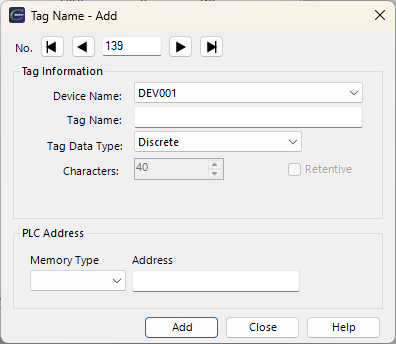
Here, you can enter required tag name parameter field information.
-
Device Name: select the corresponding C-moreconnected Control\CompactLogix PLC device from Protocol Manager
-
Tag Name: use a tag name to easily identify the tag
-
Tag Data Type: select the data type (Discrete, BCD int 16, ASCII String, etc.) that matches the PLC data type
-
Characters: this field is only active with ASCII String data type to identify the Number of Characters for the ASCII String
-
Retentive: this box is only active when you enter Internal Tags (Device Name= <INTERNAL>)
-
Tick the box to set the tag as Retentive
-
If the C-more panel loses power, SDRAM stores the tag value, and when power is restored, the tag retains that value
Data Types
These memory type values are available for the Allen-Bradley Tag-Based Control/CompactLogix PLC:
-
DINT: 32-bit 2 compliment integer: 2,147,483,648 to 2,147,483,647
-
INT: 16-bit 2 compliment integer: 32,768 to 32,767
-
SINT: 8-bit 2 compliment integer: 128 to 127
-
STRING: ASCII string value
-
CONTROL: complex Instructions
-
COUNTER: a counter
-
MESSAGE: memory for communication between remote devices
-
PID: memory for PID control functions
-
TIMER: a timer
-
BOOL: a Boolean TRUE or FALSE value
-
REAL: 32-bit floating point value +/-1.1754944e-38 to +/-3.4028237e38
Memory Type and Address
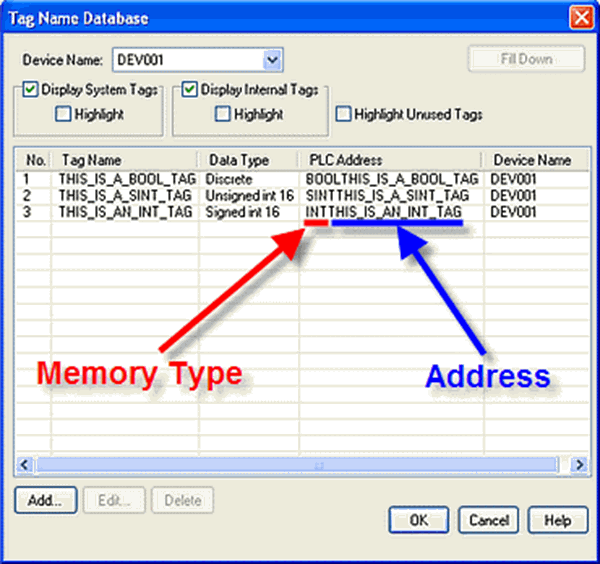
Memory Type and Address are listed together in the Tag Name Database window PLC Address column.
Below, the PLC Address is "INT THIS_IS_AN_INT_TAG" where "INT" is the memory type and "THIS_IS_AN_INT_TAG" is the actual address.
Program Scope Tags
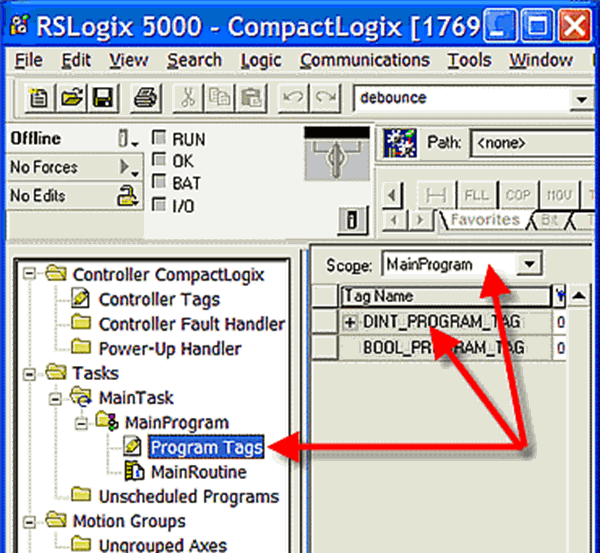
While Controller Scope tags are globally accessible, Program Scope tags are only accessible from specific programs. You can use Program Scope tags with C-more or other HMI, but they require additional syntax before the tag name.
Enter Program Scope tags as follows:
Program:aaaa.bbbb
Where "aaaa" is the PLC program name, and the tag name is "bbbb."
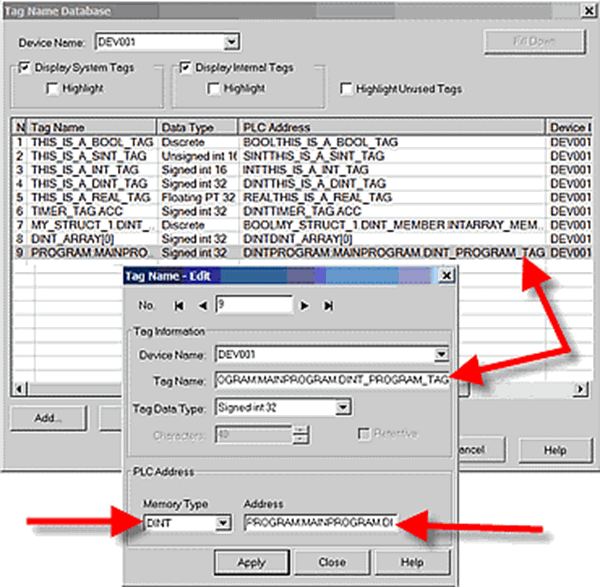
The PLC Program Name is "Main Program" and the PLC Tag Name is "DINT_PROGRAM_TAG" so the PLC Address you enter in C-more is:
PROGRAM:MAIN PROGRAM.DINT_PROGRAM_TAG
CM128