Export a Tag Name Database

Export an existing Tag Name Database in an xls or .csv(character delimited) file format.

  1. Select Export,Tag Name Database from the File menu.
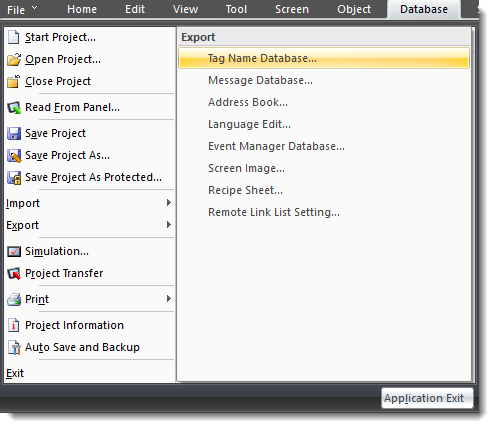
  • The Export Tag Name Database window opens.
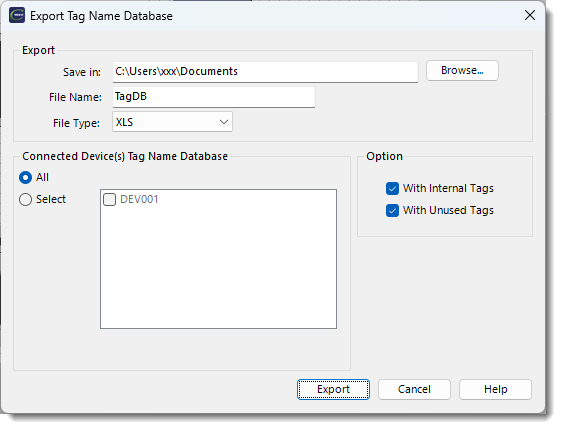
  1. In the Save in field, click Browse and browse to the folder to save the database.

  2. Complete the fields on the screen using the information in the table below.

Export Tag Name Database

Field

Description

File Name

Enter the file name or leave the default name Tag DB.

File Type

Click the drop-down arrow and select a file type of.xls or .csv.

Connected Device(s) Tag Name Database

Select All to Export the Tag Name Database for all devices in the list. To select individual devices, click on Select and click the tick box to the left of each device.

Option

The Export option includes two settings: Include Internal Tags and Include Unused Tags. Both settings are enabled by default.

  1. Click the Export button to start the export

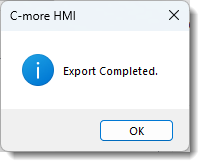
    • When the Export process is complete, an Export Completed window opens.
Related Topics Link IconRelated Topics

CM417