Project Runtime Memory
Determine what Screens, Objects, Bitmaps, or other features consume the most memory in the project.
-
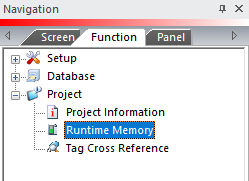
From the Main Menu, click Tools to open the drop-down menu.
— or —
from the Navigation Window, click the Function Tab.
-
Select Project.
-
Select Runtime Memory from the tree.
-
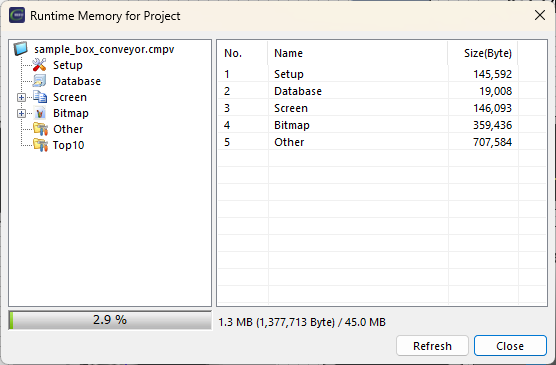
The Project Memory window shown below opens.
-
Click an icon to view memory allocation and memory use information.
-
Top 10 shows the what uses the most memory.
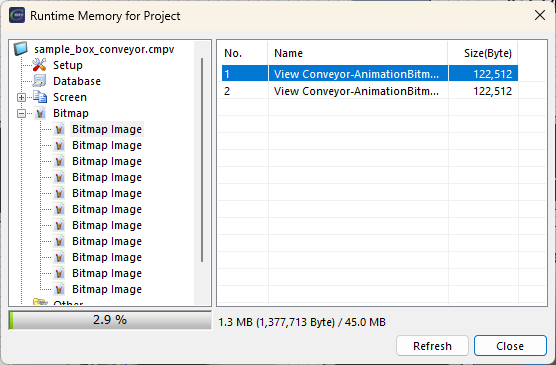
Bitmap lists images in the project with screen location and size.
 Example:
See the image below.
The first Bitmap is on Screen 'View Conveyor' and uses 122,512 bytes.
Bitmap
Bitmap lists images in the project with screen location and size.
Example:
See the image below.
The first Bitmap is on Screen 'View Conveyor' and uses 122,512 bytes.
Locate the Screen and Object
Double-click a line on the right pane.
Setup
See how much memory each panel uses.
Remote Access Feature Project Memory
Enable in Panel Network Setup.
Project Memory increases according to the panel size:
| Panel Size | Remote Access Memory Usage |
|---|---|
|
4in |
522,240 Byte |
|
7in |
1,536,000 Byte |
|
10in |
2,457,600 Byte |
|
12in |
4,096,000 Byte |
|
15in |
4,196,352 Byte |
|
22in |
8,294,400 Byte |
CM301