System Screen Password Setup
No Password
If you do not enable a system setup screen password, press the OK button in the warning dialog opens the panel Main Menu, where you can navigate to other System Setup screens.
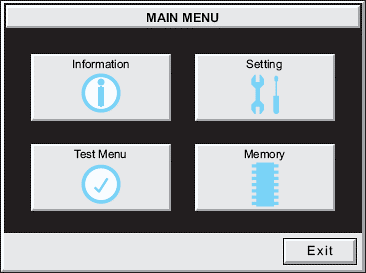
| Note: | If you enable the password system tag System Setup Screens: enable Password with Software, the Enter Security Code keypad opens. Enter the correct password to open the Main Menu system setup screen. If you enter the wrong password, the keypad clears the entry. Enter the correct password or press Cancel to exit. |
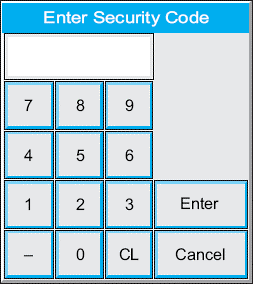
System Setup Screens: enable Password with Software
-
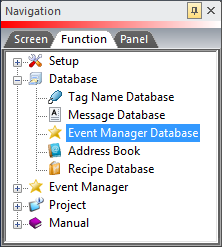
Select Event Manager Database on the Function tab.
-
The Event Manager Database window opens.
-
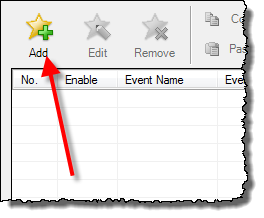
Click the Add button.
-
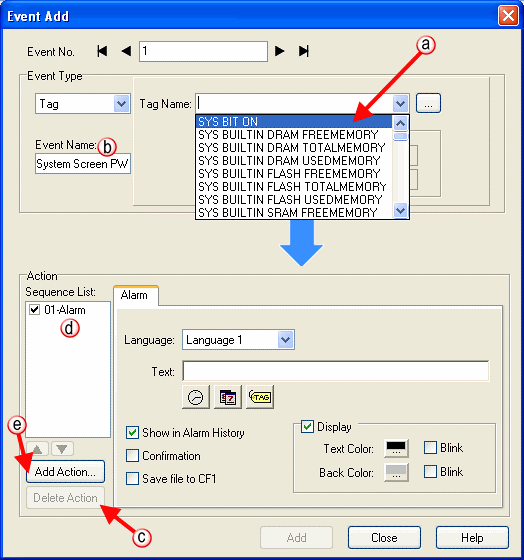
The Event Add dialog box opens.
-
Click the Tag Name drop-down menu and select System Bit On (SYS BIT ON) Tag and the tag event type is always active.
-
Optionally, click the Event Name field and type “System Screen PW.”
-
In the Action box, click once on the displayed 01-Alarm ( d) under the Sequence List.
-
The Action box is now blank.
-
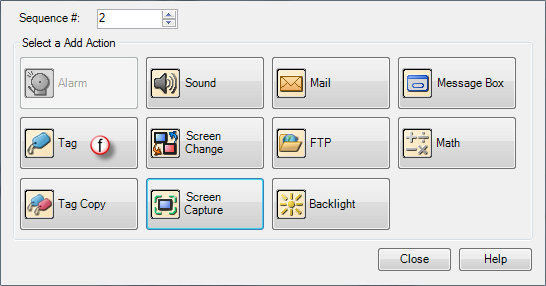
Click the Add Action button.
-
The Add Action dialog box opens.
-
Click the Tag icon to select the Action.
-
The Tag Action item displays on the Sequence List.
-
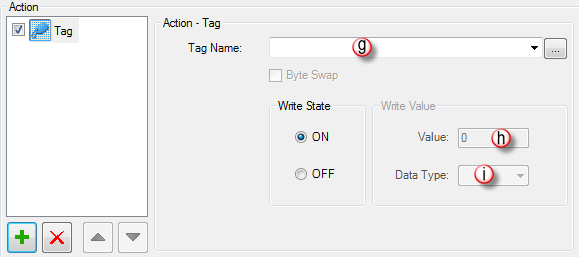
The Tag action setup window opens.
-
Click the Tag Name down arrow
 .
.
-
The Tag Name list opens
-
Select SYS SYSTEMSCREENPW.
-
Enter a numeric value into the value field, such as 777. This value is the password code to access the System Setup Screen Main Menu.
-
The Data Type BCD automatically displays on this field. Do not change it.
-
Click the Add button.
-
Click Close to return to the Event Manager Database.
-
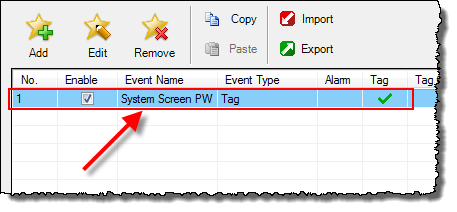
The first enabled event in the database is for the System Screen Password.
CM162