FTP Service Setup
Use your own FTP client to retrieve Recipe, Data log, Alarm log, and Screen Capture files saved to the panel external memory devices.
You can write Recipe and HTML files to the panel.
Set Up FTP Service
-
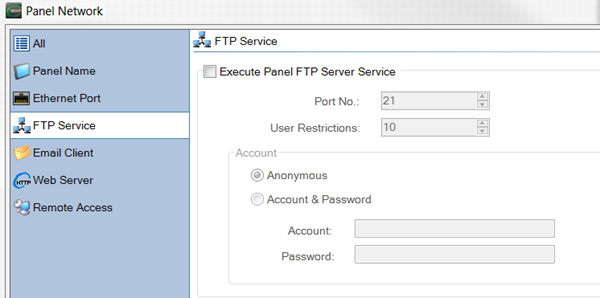
In Panel Network Setup, select FTP Service.
-
The FTP Service window opens.
-
Complete the fields on the screen using the information in the table below:
| FTP Service Setup | |
|---|---|
|
Field |
Description |
|
Execute Panel FTP Server Service |
Enable the FTP server in the panel. If you do not use the FTP server, do not tick this box. |
|
Port Number |
Default is 21. Do not change. |
|
User Restrictions |
Sets the maximum number of simultaneous remote users (1 to 10). |
|
Account |
|
|
Anonymous |
Do not require an account and password to access the FTP server. |
|
Account and Password |
Use any account and password to restrict access to the FTP server. |
|
Account |
Enter a user name or ID to access the FTP server on the panel. |
|
Password |
Enter a password to access the FTP server on the panel. |
 Related Topics