Topic: CL348

| Debounce Out Coil |
Topic: CL348
|
The Out Debounce instruction removes contact bounce (rapid On / Off oscillations that occur when mechanical switch or push button contacts are actuated) from the input signal of a rung by requiring the input to remain stable for a specified time before the Bit Memory Address responds. The On Debounce Time and Off Debounce Time can be configured individually or both can be used for the same Debounce Out Coil.
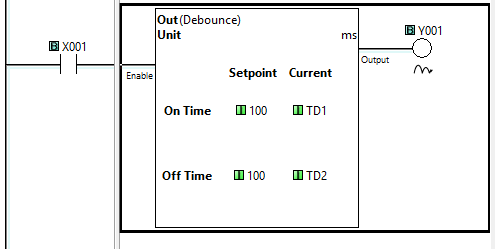
One Timer Current Value (TD) Register is used/consumed for each Debounce Timer setting. If both On Debounce and Off Debounce for one Debounce Out Coil, two Timer Current Value (TD) Registers are used/consumed.
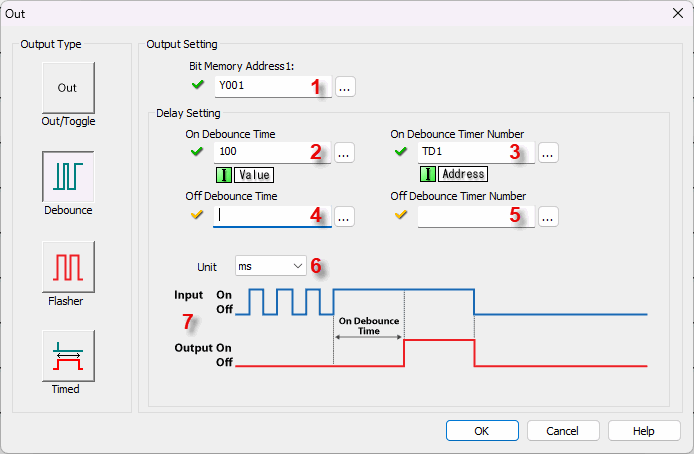

1 Bit Memory Address 1: Choose a Bit Memory Address to associate with the Out instruction. Either type the Bit Memory Address directly in the address field or use the Browse Button to open the Address Picker.
2 On Debounce Time: Assign Data Memory Address to hold the On Debounce Time value or a Constant. DS is the only eligible Data Memory Address range. Leave this field blank if only using Off Debounce.
3 On Debounce Timer Number: Assign a Timer Current Value (TD) Register to be used for the On Debounce Timer Number. TD is the only eligible Data Memory Address range. Leave this field blank if only using Off Debounce.
4 Off Debounce Time: Assign Data Memory Address to hold the Off Debounce Time value or a Constant. DS is the only eligible Data Memory Address range. Leave this field blank if only using On Debounce.
5 Off Debounce Timer Number: Assign a Timer Current Value (TD) Register to be used for the Off Debounce Timer Number. TD is the only eligible Data Memory Address range. Leave this field blank if only using On Debounce.
6 Unit: Assign the time measurement Units using the Drop Down List (ms, sec).
7 Input / Output Timing Chart: The Timing Chart updates to represent the options chosen in Steps 2 through 4 and will display according to the settings chosen.
Example Program 1: On Debounce Time Output
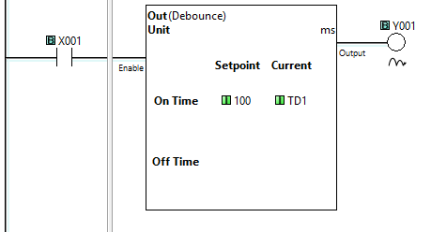
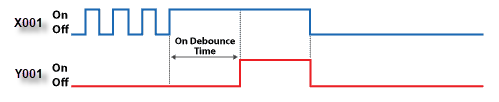
In the following example, when input status bit X001 bounces On and Off, but is On less than the On Debounce Time (100ms), output bit Y001 remains off. When input X001 remains On and level for greater than or equal to the On Debounce Time, the output status bit Y001 turns On. When X001 turns Off output status bit Y001 turns Off with no delay.
Example Program 2: Off Debounce Time Output
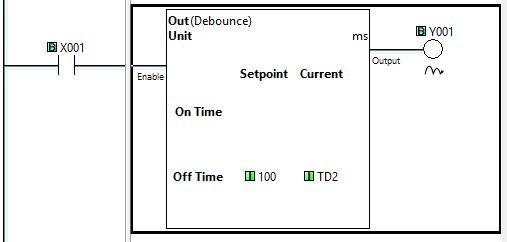
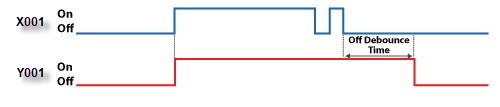
In the following example, when input status bit X001 turns On the output bit Y001 turns On. When input X001 bounces Off and On, but is Off less than the Off Debounce Time (100ms), output bit Y001 remains On. When input X001 turns off for greater than or equal to the Off Debounce Time, the output status bit Y001 turns Off.
Example Program 3: On and Off Debounce Time Output
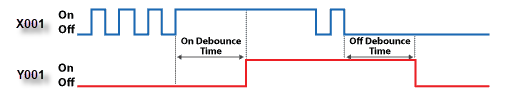
In the following example, when input status bit X001 is Off and bounces On and Off, but is On less than the On Debounce Time (100ms), output bit Y001 remains off. When input X001 remains On and level for greater than or equal to the On Debounce Time, the output status bit Y001 turns On. When input X001 is On and bounces Off and On, but is Off less than the Off Debounce Time (100ms), output bit Y001 remains On. When input X001 turns off for greater than or equal to the Off Debounce Time, the output status bit Y001 turns Off.
Out Coil
Flasher Out Coil
Timed Out Coil
Set Coil
Reset Coil