Thumbwheel
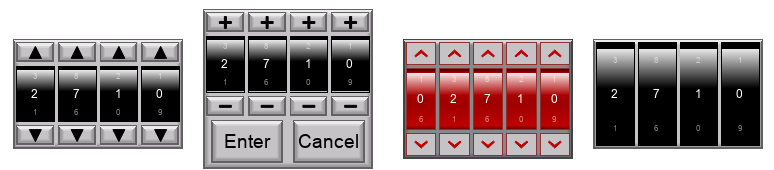
Unsigned Int 16/32
BCD Int 16/32
Represents a physical Thumbwheel switch and displays a series of digit wheels the operator can click or scroll to increment or decrement each digit independently.
Use this control to enter set points, parameters, or numeric values to a PLC tag on the touchscreen.
Use different styles for instant entry or require a separate pop-up for Enter and Cancel.
General Settings
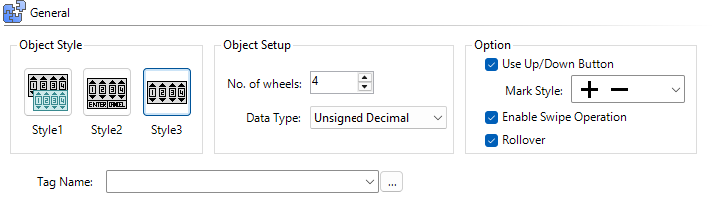
Object Style
Style 1
A simple thumbwheel control image on the screen. Press anywhere on the image to open a larger version of the control in the middle of the screen for smaller displays where the up/down buttons are too small.
Style 1 includes an Enter/Cancel button in the pop-up.
Style 2
Launches the same control as Style 1 but does not open a larger version. The object displays the original object as drawn. includes a Enter and Cancel buttons.
Style 3
Applies a tag value change immediately. There are no Enter or Cancel buttons.
Options
Use Up/Down Buttons: turn the up/down buttons on and off. Touch the upper and lower parts of the wheel to change the value.
Enable Swipe Operation: swipe up or down on a digit to increment or decrement a digit.
Rollover: automatically increments the wheel to 0 after 9 and to 0 after 0.
Use care, as changes occur quickly.
| Note: | Rollover does not increment or decrement the less significant digit. |
Appearance:
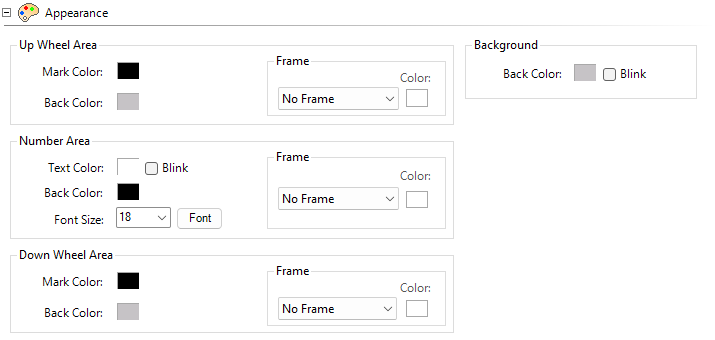
Style each section with colors and frames.
Font & Color
Behavior
For information, see Behavior.
Password
For more information, see Password.
 Related Topics
Thumbwheel
CM424