Topic: CL351

| Drum Instruction: Time & Event Base |
Topic: CL351
|
The Drum instruction simulates an electromechanical drum sequencer, using either a Time Base, an Event Base, or a Time & Event Base sequencing strategy. Each Drum instruction is capable of sequencing through 1 to 16 steps and turning ON as many as 16 outputs in a user defined pattern. Outputs can be either physical outputs or internal control relays. A Flag Bit is turned ON to indicate the completion of the sequence. The Time & Event Base Drum instruction advances each step when the specified time Duration has elapsed and the Event input is ON and level. Each step can be Time Base only, Event Base only, or both Time & Event Base.
|
|
Note: Time & Event Base is not supported on C0-0x Series CPUs. |
|
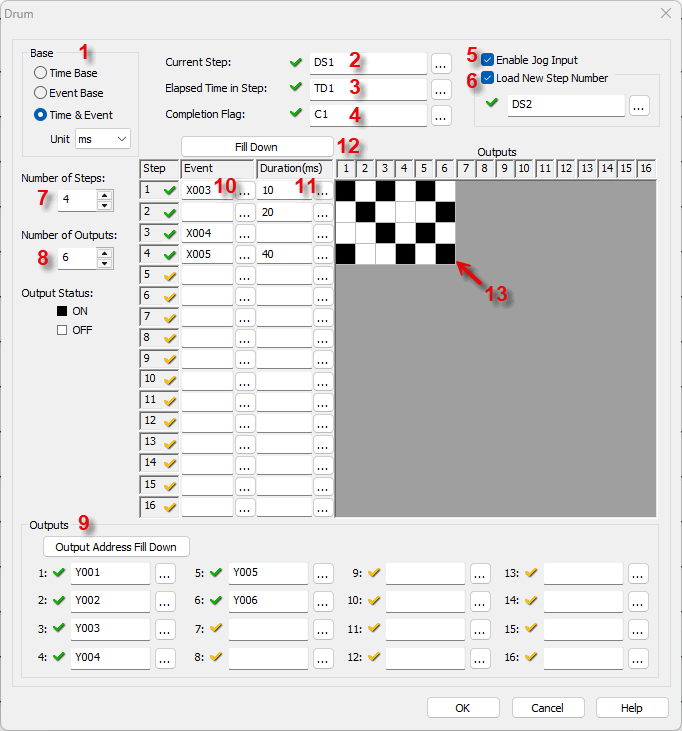

1 Base: The Drum instruction operates either on a Time Base, or an Event Base, or a Time & Event Base. If Time & Event Base is selected, the increment of time is also chosen from the drop down list. The available time increments are milliseconds, seconds, minutes, hours, or days.
2 Current Step: Identify the Memory Address where the Current Step number will be stored. This must be a DS type Memory Address.
3 Elapsed time in step: Identify the Memory Address where the Elapsed Time in Step will be stored. This must be a TD Type Memory Address.
4 Completion flag: Assign a Control Relay (C bit) to be the Completion Flag.
5 Enable Jog Input: Selecting Enable Jog Input turns on an additional rung that allows the user to jump to the next Step each time the Jog input transitions from OFF-to-ON.
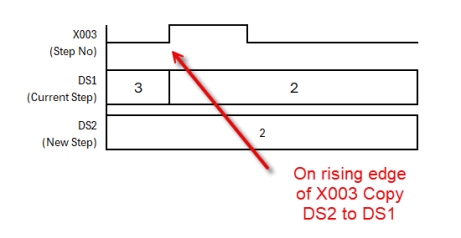
6 Load New Step Number: Selecting Load New Step turns on an additional rung "Step No Input" that allows the user to jump to a specified Step in the sequence. Assign a Memory Address to hold the desired new Step Number. This must be a DS type Memory Address.The Step No Input is edge triggered. When the Step No Input transitions from OFF-to-ON, the value of the new Step Number is copied to the Current Step.
7 Number of Steps: Select a number from 1 to 16. This will determine the number of steps in the sequence.
8 Number of Outputs: Select a number from 1 to 16. This will determine the number of outputs available during the sequence.
9 Outputs: Assign Outputs. Outputs can be physical Outputs and/or internal control relays. The number of Outputs should match the number chosen at item 8, above.
You can use the Output Address Fill Down button  to enter consecutive Addresses automatically. Enter the first Memory Address and keep clicking the Output Address Fill Down button.
10 Event: Assign the bit-level Memory Address that will initiate each Step. The number of Steps, when included with 11, will match the number chosen at 7, above.
11 Duration: Assign a time Duration for each Step. The number of Steps, when included with 10, should match the number chosen at item 7, above.
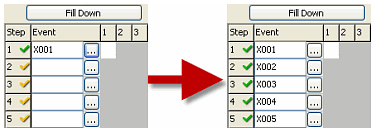
12 Fill Down: The Fill Down button  may help you enter the time Events or Durations quickly. The last selected field will be the one Filled Down
13 Output Pattern: Click in the grid to develop the sequence the Drum instruction will follow. Each cell corresponds to a combination of one Step number and one Output number.
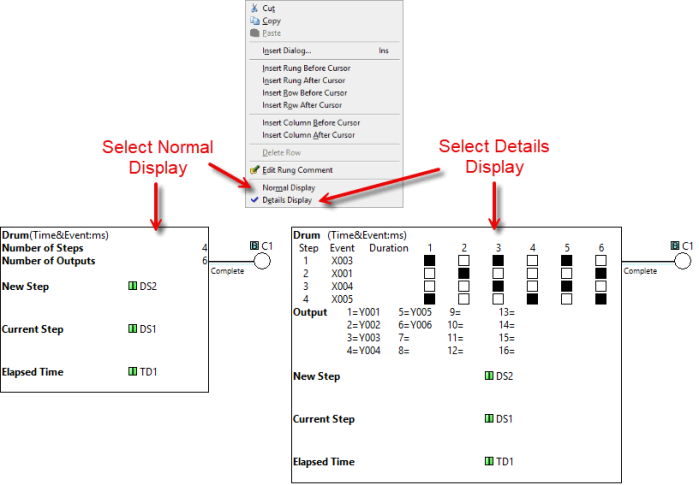
Example Program: Time and Event Base
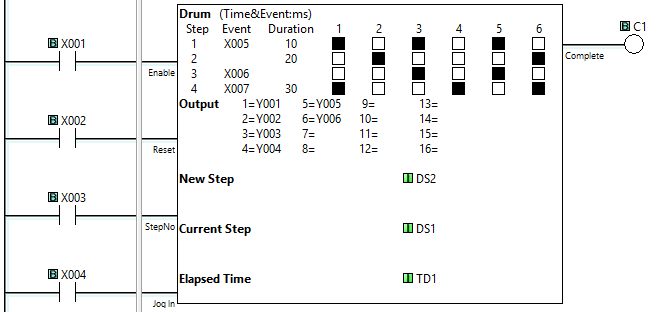
In the following example:
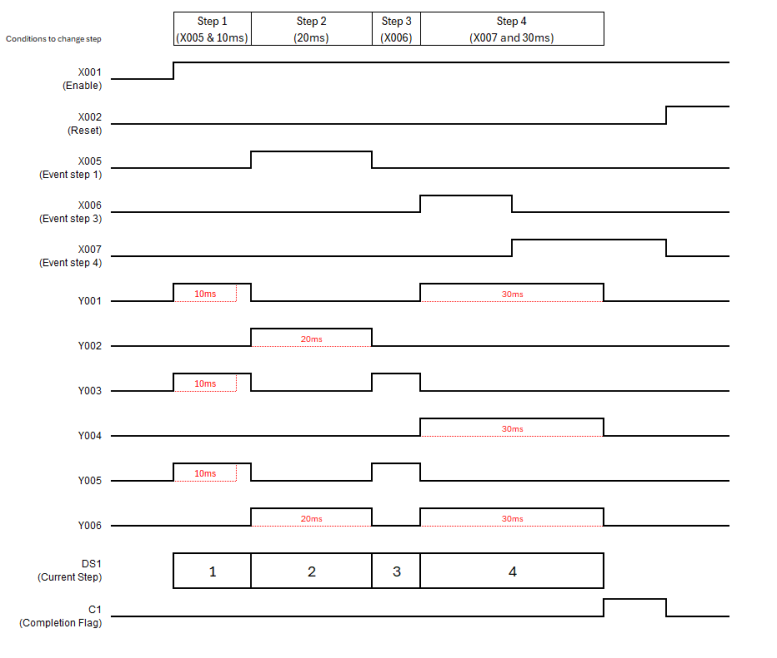
When X001 is ON, the Drum instructions is enabled and Step 1 begins. The outputs corresponding to Step 1 will turn ON until Step 1 ends.
When X005 turns ON and 10 ms has elapsed, Step 1 ends and Step 2 begins. The outputs corresponding to Step 2 will turn ON until Step 2 ends.
When 20 ms elapses, Step 2 ends and Step 3 begins. The outputs corresponding to Step 3 will turn ON until Step 3 ends.
When X006 turns ON, Step 3 ends and Step 4 begins. The outputs corresponding to Step 4 will turn ON until Step 4 ends.
When X007 turns ON and 30 ms has elapsed, Step 4 ends and the sequence is complete. C1 Complete turns ON.
If X003 turns ON, the Drum instruction jumps to the New Step number loaded in DS2.
If X004 turns ON, the Drum instruction jumps to the Next Step in the sequence.
When X002 turns ON, the Drum instruction is Reset.
Drum Instruction: Time Base
Drum Instruction: Event Base
Memory Addresses
Data Types
