Tri-State Indicator
A tri-state indicator is any three-state object, such as a valve, that allows you to use 2-bits to indicate three states of the process, Open, In Travel, and Close.

| Close On | Close Off | |
|---|---|---|
|
Open On |
In Travel |
Open |
|
Open Off |
Close |
In Travel |
You can use the default valve icon or any image from Graphic Studio®.

The object can be any 3-state indicator controlled by two discrete tags.
You can use any kind of object:
• Pneumatic/hydraulic cylinder (extend/retract/in motion)
• Motor status (running/stopped/accel-decel)
• Tank level (low/high/normal)
• Safety gate (open/closed/indeterminate)
General
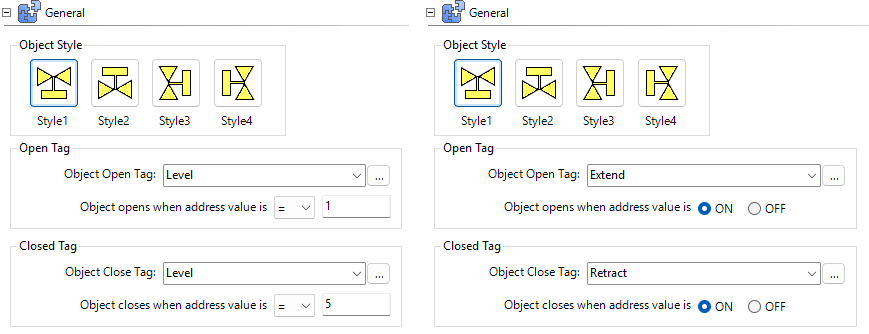
Control options vary with tag data type. If you use a discrete tag, states are determined by the tag On/Off state.
If you use an integer tag, the state is based on a compared value.
Appearance
You can set a tri-state indicator with text, images, or both.
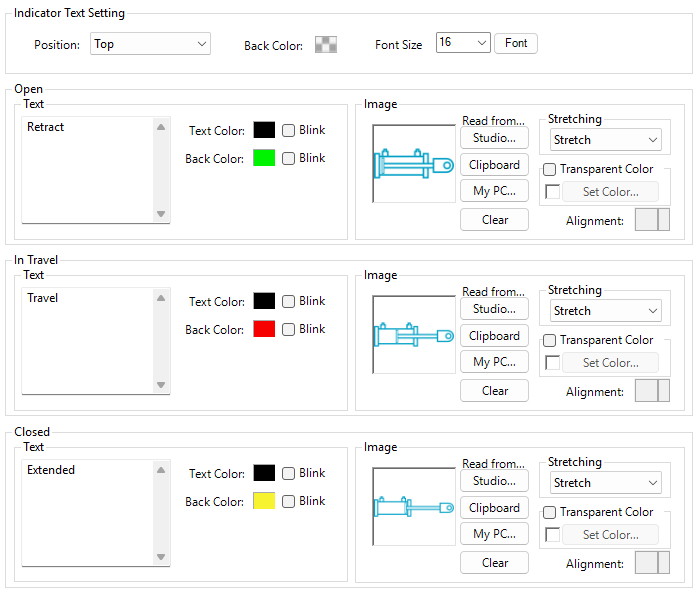
Indicator Text
Position: left, right, top, or bottom
Back Color: sets the object background
Font Size: sets the font and size
Text and Image: Open, In Travel, and Closed
Text color and back color set default image colors. These settings do not apply to custom images.
You can assign On and Off State text and images.
For more information, see Common Object Settings and Behavior.
 Related Topics
Tri-State Indicator
CM187