Topic: CL177

| For Instruction |
Topic: CL177
|
The For instruction indicates the starting point of a For - Next loop, and based on its user setting, determines how many times the For - Next loop will be executed in one program scan. Between the For instruction rung and the Next instruction rung, place the rungs of logic that should be repeated multiple times. The For - Next loops can also include Break and Continue. Break and Continue are only supported by CLICK Ethernet (C0-1x) and CLICK PLUS (C2-x) CPUs. Up to three For - Next loops can be nested. For - Next loops contained within called Subroutines count toward this limit.
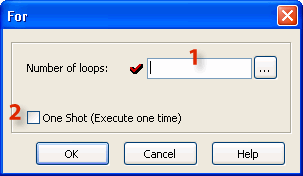
1 Number of loops: The Number of loops can be a constant typed directly or it can be any eligible Data Memory Address.

|
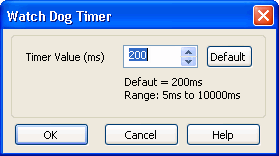
Note: If the Number of Loops setup is large, it will increase the program scan time. When the program scan time exceeds the Watchdog Timer setup (Default = 200ms), the CLICK PLC drops from the Run mode. You may increase the Watch Dog Timer setup.
|
|
2 One Shot: Select the One Shot by clicking the check box. If One Shot is selected, the For-Next Loop will be processed (all loops) one time after being enabled. The For-Next Loop will not be executed again until there is another OFF-to-ON transition by the enabling contact. For nested For - Next loops only the outer most loop can use this selection.
For Program examples see Next/Break/Continue Instruction