|
|
Topic: P346 |
Structured Text Programming Fundamentals |
|
|
|
Topic: P346 |
Structured Text Programming Fundamentals |
|
Structured Text is a high-level, text-based programming language similar, but not identical, to IEC 61131-3 standards. It allows users to create powerful expressions and structured logic using statements and operators.
This topic covers the basics of Structured Text programming and suggestions for good programming fundamentals.
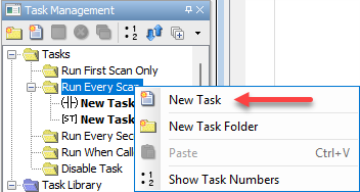
New structured text tasks can be created using the right-click context menu in the Task Management panel and then choosing Structured Text as the task type for the new task.
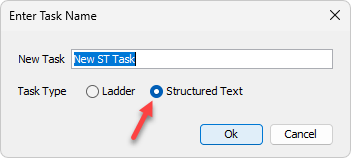
Note: Once created, a task cannot be converted between Ladder and Structured Text.
Example:randNum := RANDOM( ); returns a random number and assigns it to randNum
Example:An instance of a timer function block.
- timer1(IN := timer1_enable, PT := timer1_preset);
The timer function block has four elements
- ET (elapsed time)
- IN (timer enable input)
- PT (preset time)
- Q (timer done – i.e. ET >= PT)
Note: In Productivity Suite, a tag instance of a function block tag structure must be created in order to use the function block instance in structured text.
Example:IF
tag1 = 2
THEN
Tag2 := 10;
ELSE
Tag2 := 5;
END_IF;
- Structured Text expressions consist of Operands and Operators
- Operands may be Tags, Constants, and Function calls
- Operators may be:
- Math or comparison symbols, such as +, -, <, >, AND, OR, etc.
- Function calls, such as COS, SIN, TAN, FLOOR, CEIL, etc.
- Advanced functions / instructions, such as @CALL() or @UDI()
Structured Text programming syntax requires a set structure and format for writing lines of code. It defines how commands and instructions are written in a way that the CPU can understand and execute. Syntax encompasses everything from keywords and operators to punctuation and formatting conventions, defining the correct way to write code.
Each complete code statement must end with a semicolon.
Control flow statements must contain the complete control flow structure.
A single code statement or control flow structure may include multiple lines of code.
Example:
IF
Tag1 = 1
THEN
Tag2 := 5;
END_IF
In order to use tags that contain disallowed characters (such as system tags), the tag must be enclosed in curly braces and prefixed with a “$” – for example, to use the “2 Second Bit” tag in ST code, it must be coded as follows, “${2 Second Bit}”. See the Tag Requirements section of this topic for a list of characters that are not allowed in tags used in ST code.
Advanced functions must be preceded by an “@” character. For example, @CALL is the advanced function used to call a task in the Run When Called folder. UDI Instruction can be instantiated by typing @UDI. Both @CALL and @UDI must be configured using the dialog that is accessible via the right-click context menu Edit Instruction option or via the Shift + Space keyboard shortcut.
The following constant types are supported:
Boolean
• TRUE or FALSE (automatically converted to uppercase)
Integer
• Whole numbers
• May include + or – prefix
Float
• Decimal values
• May include exponent notation (e.g., 1.23E5)
String
• Enclosed in double quotes (example: "Sample Text")
Hexadecimal
• Prefixed with: 0x, 0X, or 16#
Binary
• Prefixed with: 0b or 2#
Octal
• Prefixed with: 8#
Operators follow defined precedence rules.
Highest precedence:
1. Parentheses ( )
2. Function calls
3. Exponentiation (^ or **)
4. Negation (-)
5. NOT or (!)
6. Multiply (*), Divide (/), Integer Divide (\), Modulo (MOD or %)
7. Add (+), Subtract (-)
8. Comparison (<, >, <=, >=)
9. Equality (=), Inequality (<>) or (!=)
10. Boolean AND (or &)
11. Boolean XOR
12. Boolean OR
Note: Operators of equal precedence evaluate left to right. Recommended practice is to use parentheses to ensure that operations are performed in the desired order.
Assignment uses the := operator.
Example:
counter := counter + 1; //adds 1 to the value of counter and assigns the new value to counter
speed := RPM * 0.1047; //multiplies the value of RPM by 0.1047 and assigns the new value to speed
Note: Multiple assignments are allowed in the same line of code, as long as the data types match.
For example:
int3 := int2 := int1 + 5; // assigns the value of int1 + 5 to int2 and int3
int6 := int5 := int4; // assigns the value of int4 to int5 and int6
Example:
IF condition THEN
statements;
ELSIF condition THEN
statements;
ELSE
statements;
END_IF;
Example:
CASE variable OF
1: statement; // single condition
2,3, 11: statement; // comma separated condition list
5..10: statement; // condition range from 5 to 10
ELSE
statement;
END_CASE;
Example 1: FOR Loop
FOR i := 1 TO 10 BY 1 DO
statements;
END_FOR;
Example 2: WHILE Loop
WHILE condition DO
statements;
END_WHILE;
Example 3: REPEAT Loop
REPEAT
statements;
UNTIL condition
END_REPEAT;
Note: Use the EXIT keyword within a loop statement (FOR, WHILE, or REPEAT) to end the loop execution.
Note: Use caution when implementing time-based functions (such as TON, TOF, and TP) within FOR, WHILE, and REPEAT loops as they may not function as expected.
Structured Text uses bracket notation for array elements and array indexing is 1-based.
Examples:
1D_array[1] := 100 //assigns a value of 100 to the first element of Array1D
2D_array[3,2] := 50 //assigns a value of 50 to the element at row 3, column 2 of 2D_array
Functions may use either informal or formal parameter assignments.
Examples:
Informal Parameter List
Angle1 := DEG(radValue);
Formal Parameter List
Angle1 := DEG(radians := radValue);
The following list contains characters that are not allowed in tag names that are used in ST code.
• Cannot contain operator symbols (e.g. +, -, =, *, /, \, #, @, ^, %, <, >,).
• Cannot contain spaces.
• Cannot contain brackets [ ] or braces { }.
• Cannot contain semicolons.
• Cannot use reserved keywords (IF, THEN, PI, TRUE, etc.).
• Must exist in the Tag Database or can be created from the editor (see the note below).
Undefined tags are underlined in red until defined.
Note: New tags may be created directly from the editor by entering the desired tag name in the code. Once all syntax errors are corrected the clicking the Validate button or typing Shift + F8 will open the Define Tags dialog which will allow the user to define and create new tags.
• Errors are underlined in red.
• Navigation buttons allow moving between errors.
• Incorrect syntax or undefined tags prevents successful compile.
Note: Divide by Zero will not generate a compile error and will have a result of Zero (0).
• Use indentation for readability.
• Group related logic into structured blocks.
• Use meaningful tag names.
• Comment complex logic sections.
• Use formal parameter lists for clarity in complex instructions.
See below for an example of a structured text task:
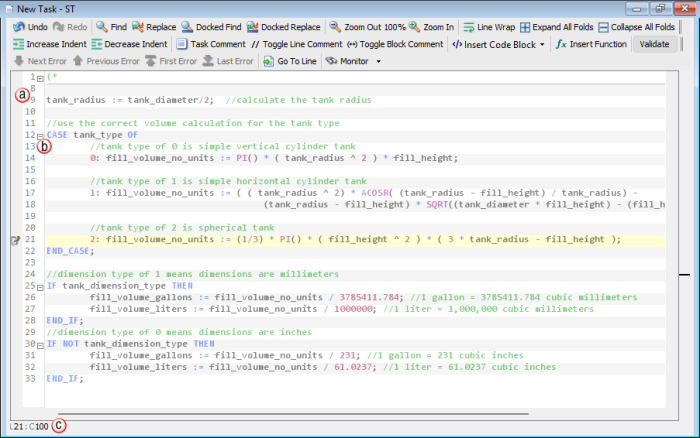
Note: In some cases, Structured Text code will have a different impact on PLC scan than similar Ladder code. In particular, conditional commands like IF, FOR, WHILE, REPEAT, and CASE may take more processing time than their ladder counterparts, especially for very simple logic configurations.

 Related Topics