MC_GearIn
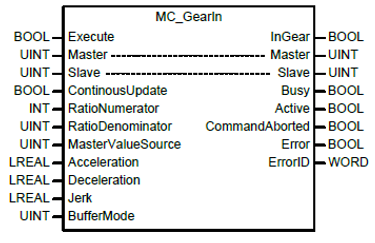
| Element Name | Element Type | Description |
|---|---|---|
| Execute | Input | Edge detected request to execute the function block. |
| Master | Input/Output | Select the master axis for the gearing operation. This must be a UINT variable with a value of the master axis number. |
| Slave | Input/Output | Select the slave axis for the gearing operation. This must be a UINT variable with a value of the slave axis number. |
| ContinuousUpdate | Input | Specify the update setting of the input value. This is explained in section 6.1.5 of the XMC user manual. |
| RatioNumerator | Input | Specify the numerator of the gear ratio (-32768 ~ 32767). |
| RatioDenominator | Input | Specify the denominator of the gear ratio (0 ~ 65535). |
| MasterValueSource | Input |
Select the source of the main axis for gearing operation.
|
| Acceleration | Input | Specify the acceleration at the beginning of the gearing operation. |
| Deceleration | Input | Specify the deceleration at the beginning of the gearing operation. |
| Jerk | Input | Specify the change rate of acceleration/deceleration. |
| BufferMode | Input | Specify the sequential operation setting. See BufferMode table below. |
| InGear | Output | Indicates the gearing operation is running. |
| Busy | Output | Indicates the function block is currently being executed. |
| Active | Output | Indicates the function block is controlling the slave axis. |
| CommandAborted | Output | Indicates the function block was aborted. |
| Error | Output | Indicates whether an error occurs or not. |
| ErrorID | Output | Error Identification number. |
 BufferMode Table
Sections 6.1.4 and 8.2.10 of the XMC user manual provide more information about buffer modes.
| Value | Buffer Mode | Description |
|---|---|---|
| 0 | Aborting | Abort previous command and execute the command immediately. |
| 1 | Buffered | Execute the command after previous command is completed. |
| 2 | BlendingLow | The new command is blended into a previously executed command using the lower velocity value when comparing the previous command and new command. |
| 3 | BlendingPrevious | The new command is blended into a previous command using the velocity of the previous command. |
| 4 | BlendingNext | The new command is blended into a previous command using the velocity from the new command. |
| 5 | BlendingHigh | The new command is blended into a previous command using the higher velocity value when comparing the previous command and new command. |
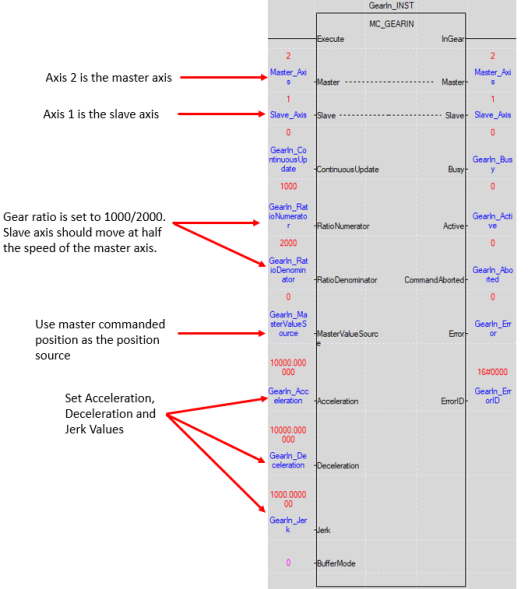 MC_GearIn Status Monitor
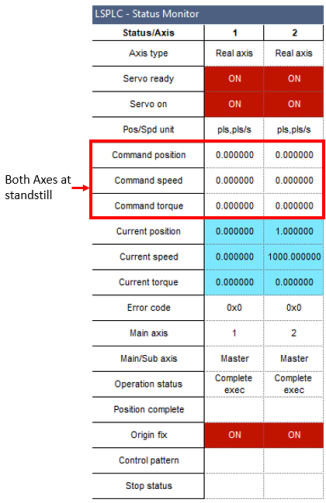
Before executing MC_GearIn
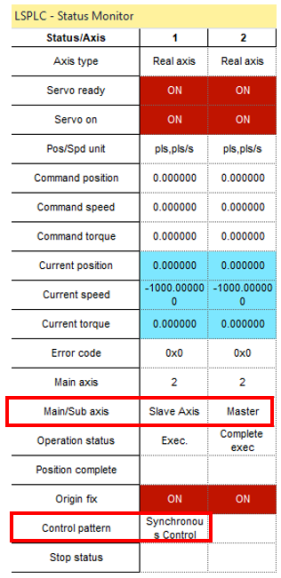
After executing MC_GearIn with Axis 1 as slave
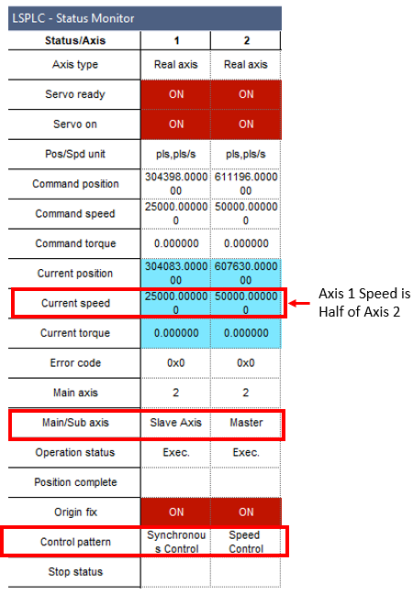
After executing MC_MoveVelocity on Axis 2 as master
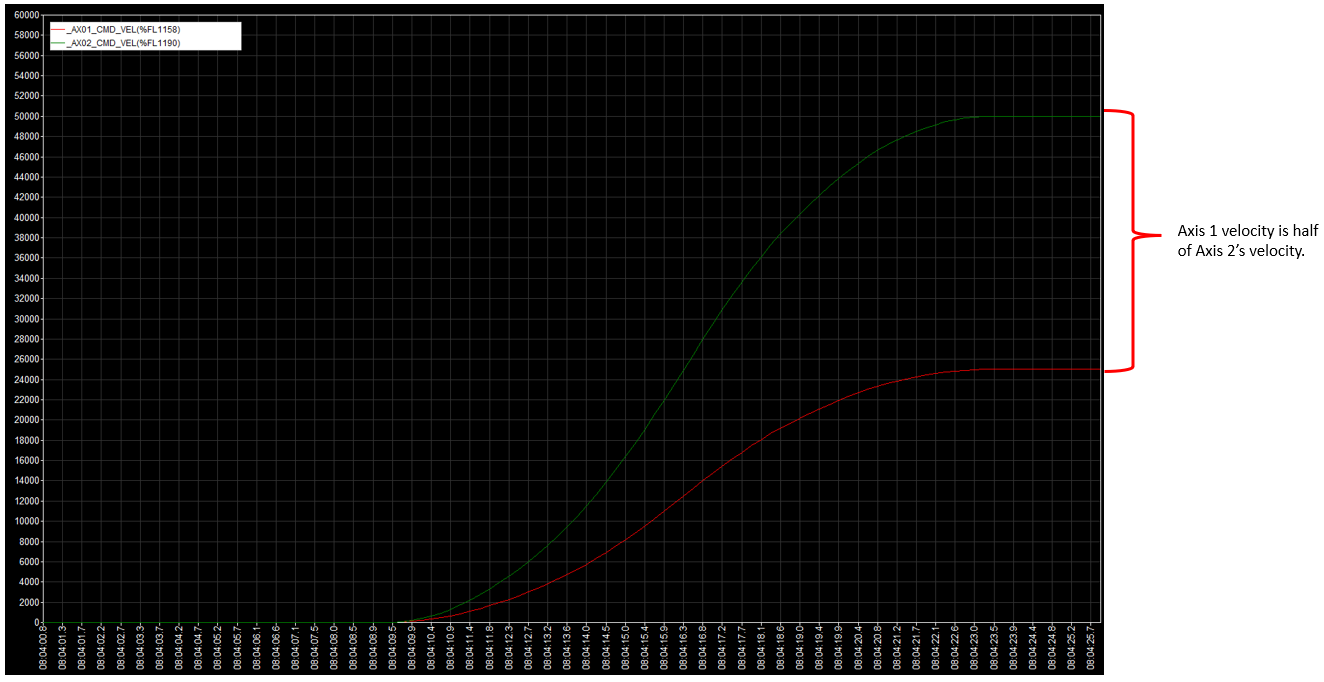 Structured Text Example
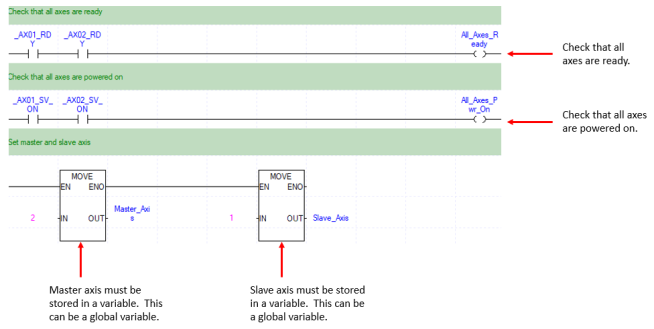
//Check that all axes are ready
IF (_AX01_RDY) AND (_AX02_RDY) THEN
All_Axes_Ready := TRUE;
ELSE
All_Axes_Ready := FALSE;
END_IF;
//Check that all axes are powered on
IF (_AX01_SV_ON) AND (_AX02_SV_ON) THEN
All_Axes_Pwr_On := TRUE;
ELSE
All_Axes_Pwr_On := FALSE;
END_IF;
//Set MasterAxis and SlaveAxis variables
Master_Axis := 2;
Slave_Axis := 1;
IF (All_Axes_Pwr_On) AND (All_Axes_Ready) THEN
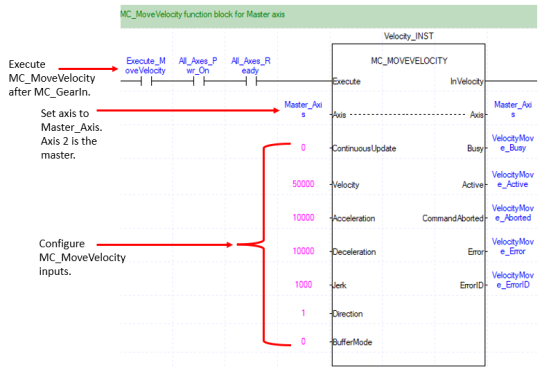
//MoveVelocity command for master axis
Master_MOVEVELOCITY(Execute:=Execute_MasterMove, Axis:=Master_Axis, ContinuousUpdate:=0, Velocity:=50000.0, Acceleration:=10000.0, Deceleration:=10000.0, Jerk:=1000.0, Direction:=1, BufferMode:=0, ErrorID=>Master_MOVEVELOCITY.ErrorID);
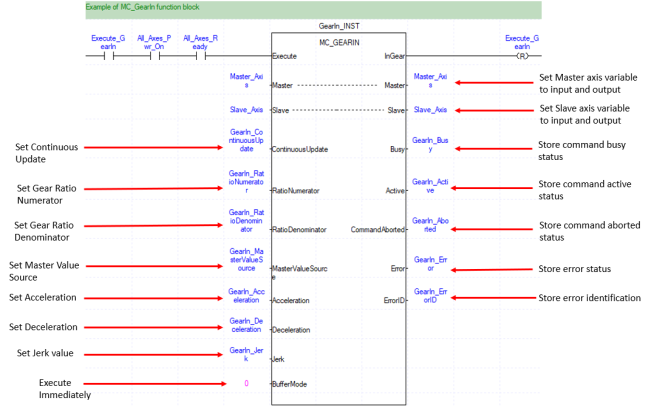
//Example MC_GearIn fb
Slave_GEARIN(Execute:=Execute_GearIn, Master:=Master_Axis, Slave:=Slave_Axis, ContinuousUpdate:=0, RatioNumerator:=Slave_GEARIN.RatioNumerator, RatioDenominator:=Slave_GEARIN.RatioDenominator, MasterValueSource:=Slave_GEARIN.MasterValueSource, Acceleration:=Slave_GEARIN.Acceleration, Deceleration:=Slave_GEARIN.Deceleration, Jerk:=Slave_GEARIN.Jerk, BufferMode:=0, ErrorID=>Slave_GEARIN.ErrorID);
END_IF;
LM605-1