How to Review and Edit the EtherCAT Service Data Object (SDO)
The EtherCAT Process Service Object (PDO) is used for asynchronous transmission of data between the master and slave nodes. The motion controller performs asynchronous service data communication for error information in the slave and parameter reading/writing.
-
The EtherCAT Slave Information (ESI) file defines the parameters of the SDO for an EtherCAT slave device.
-
XG5000 allows the SDO to be reviewed and modified for your system configuration.
Accessing the SDO of an EtherCAT slave
| Step | Action |
|---|---|
| 1 |
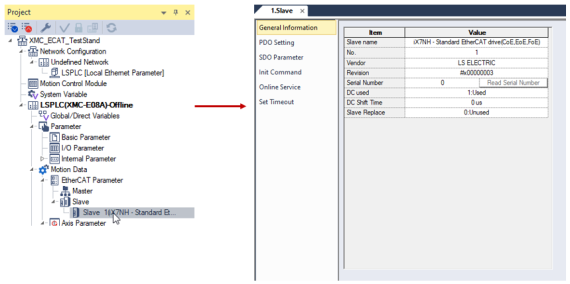
In the XMC project, double-click on the EtherCAT slave device to open its configuration window.
|
| 2 |
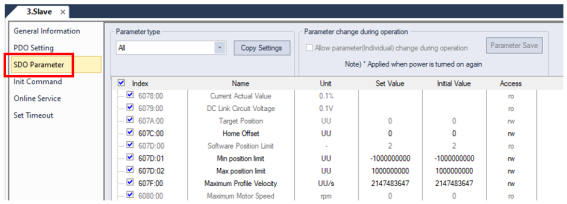
Click SDO Parameter in the EtherCAT slave configuration screen.
|
| 3 |
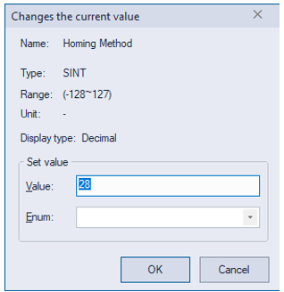
Double-click on the Set Value Column of a parameter to modify. This example shows Homing Method.
|
| 4 |
Enter the value for the parameter and press OK when done.
|
| 5 | Connect to the XMC with XG5000. |
| 6 |
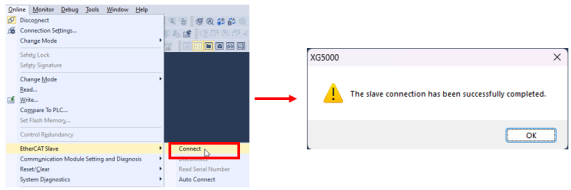
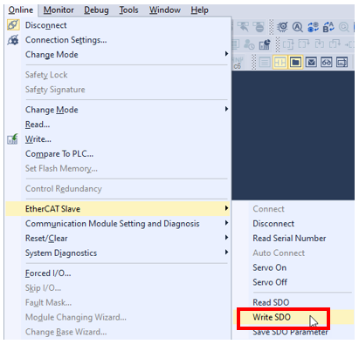
Choose Online menu è EtherCAT Slave è Connect. This will connect the EtherCAT network.
|
| 7 |
Choose Online menu è EtherCAT Slave è Write SDO.
|
| 8 |
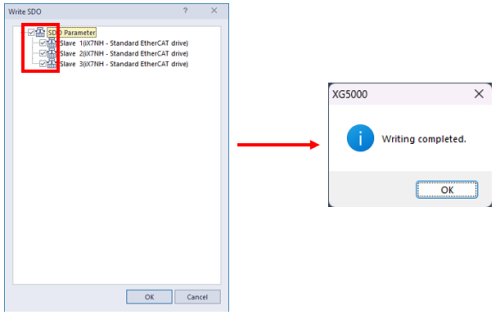
Choose which EtherCAT slaves to write the SDO data too. Press OK when done.
|

LM413