FTP Server Functions
The XMC supports the File Transfer Protocol (FTP) through the built-in ethernet port. FTP is a TCP/IP based protocol designed for transferring and managing files from a remote site. The XMC Motion Controller acts as an FTP server and the computer connecting to it will be the client.
-
The client can only access files on the SD memory card.
-
Files may only be read from the FTP server. This is to prevent modifications to the files.
-
See Chapter 14 of the XMC User manual for FTP response codes and supported console commands.
Warning: FTP password and user name are sent over clear text. Make sure to secure your network before enabling FTP.
FTP Server Setup
| Step | Action |
|---|---|
| 1 |
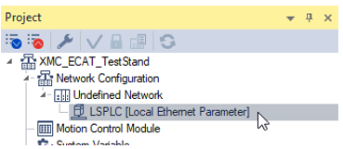
In the XG5000 project, open the Local Ethernet Parameter settings in the Project window.
|
| 2 |
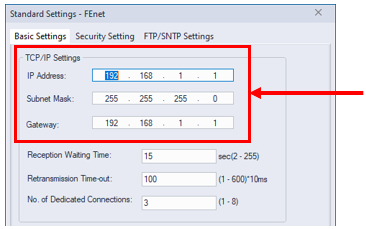
Configure the IP Address of the XMC.
|
| 3 |
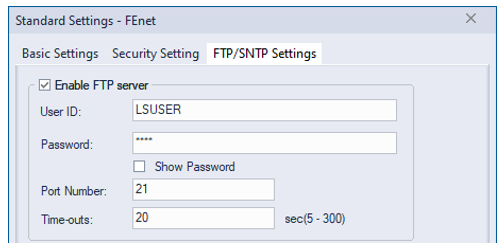
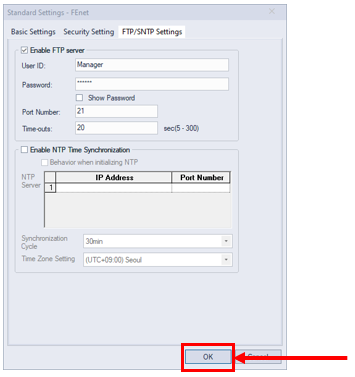
Select the FTP/SNTP Settings tab.
|
| 4 |
Enable the checkbox labeled Enable FTP server.
|
| 5 |
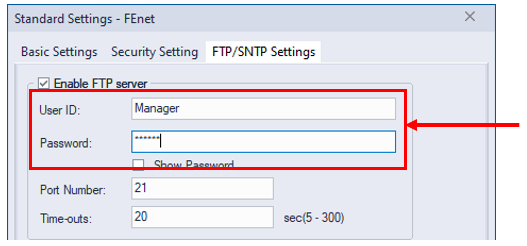
Configure your User ID and Password.
|
| 6 |
Press the OK button to finish configuration.
|
| 7 |
Write the project to the XMC. |
| 8 |
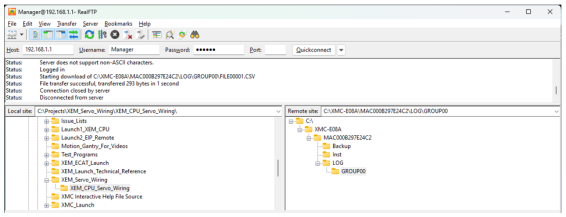
Connect to XMC with an FTP program.
|

LM200