Reset PLC Commands
Reset PLC (Reset) Command
Reset PLC will reboot the XMC. When the XMC is finished rebooting, it will delete error/warning information to allow boot up. Error/warning condition may occur again if it wasn’t solved before Reset PLC was performed.
| Step | Action |
|---|---|
| 1 | Connect to the XMC with XG5000 software. |
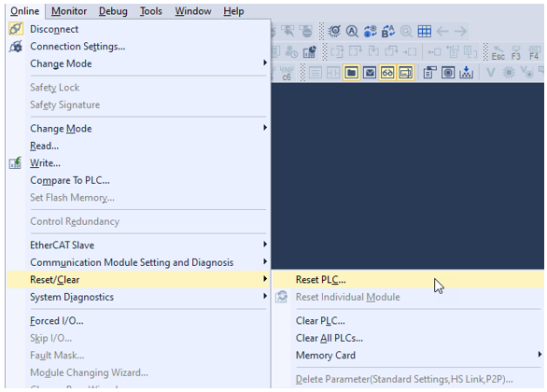
| 2 | Select Online è Reset/Clear è Reset PLC...
|
| 3 |
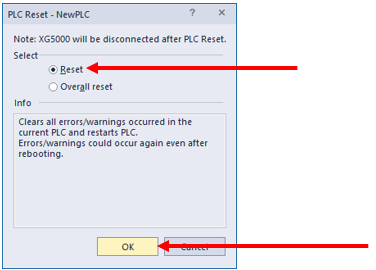
Select Reset and press OK.
|
| 4 |
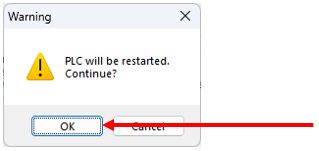
Press OK on warning screen to perform Reset PLC.
Note: XMC will reboot and XG5000 will lose connection to it. |
Select PLC (Overall Reset) Command
Reset PLC will reboot the XMC. When the XMC is rebooted, it will delete these items to allow boot up:
-
Error/warning information
-
Latch 1 area
-
I/O skip
-
Error mask
-
Forced I/O setting area
Error/warning condition may occur again if it wasn’t solved before Reset PLC was performed.
| Step | Action |
|---|---|
| 1 |
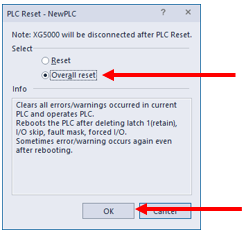
After navigating to Reset/Clear (see Reset PLC (Reset) Command), select Overall reset and press OK.
|
| 2 |
Press OK on warning screen to perform Reset PLC.
Note: XMC will reboot and XG5000 will lose connection to it. |
LM107-1