Software Overview-XG5000 XMC Project Window
The Project Window is the primary area for project development for the XMC. All development for the XMC is done with XG5000.
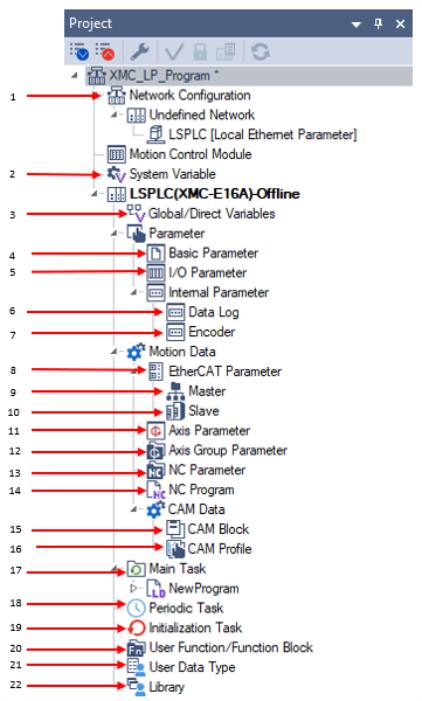
| Project Feature | Label Number | Description |
|---|---|---|
| Network Configuration | 1 | Used to configure the built-in Ethernet port of the XMC. |
| System Variable | 2 | Contains the variables shared among PLCs through the network. |
| Global/Direct Variables | 3 | Used to create Global variables and Access to XMC Direct Variables. |
| Basic Parameter | 4 | Basic Operation Parameter setup for XMC. |
| I/O Parameter | 5 | Used to setup built-in I/O for XMC. |
| Data Log | 6 | Used to setup data logging capability of the XMC. |
| Encoder | 7 | Used to setup the built-in encoder inputs of the XMC. |
| EtherCAT Parameter | 8 | This section contains EtherCAT master and slave setup. |
| EtherCAT Master | 9 | Used to setup the XMC’s EtherCAT master capabilities. |
| EtherCAT Slave | 10 | Use to add and setup EtherCAT slaves for the XMC to control. |
| Axis Parameter | 11 | Used to add real and virtual motion control axes to the XMC project. |
| Axis Group Parameter | 12 | Used to create and setup Axis groups. |
| NC Parameter | 13 | Configure the NC Channel to execute NC Programs. |
| NC Program | 14 | NC Program contains the g-code run by the NC system of the XMC. |
| CAM Block | 15 | The CAM Block is used to configure the CAM pattern and assign it to a CAM profile. |
| CAM Profile | 16 | Used to setup the CAM profile that is executed by a camming function blocks. |
| Main Task | 17 | Main Task section for programs. |
| Periodic Task | 18 | Section for periodic programs. |
| Initialization Task | 19 | Section for initialization programs that run on first power up. |
| User Function / Function Block | 20 | User created functions and functions blocks will be contained in this section. |
| User Data Type | 21 | User created data types will be contained in this section. |
| Library | 22 | Contains any imported XG5000 libraries. |
LM105