Topic: CL344

| Send and Receive ASCII Instructions |
Topic: CL344
|
Sending and Receiving ASCII has 2 options: Half Duplex and Full Duplex (C2-DCM and RS232 Only). Refer to the section below matching your port's configured Duplex setting
Using Half Duplex to send and receive ASCII Instructions to and from external devices you must have at least one scan between the Success and the Enable signals. If less that one scan between signals data may be lost. Please refer to Half Duplex Timing Chart below.
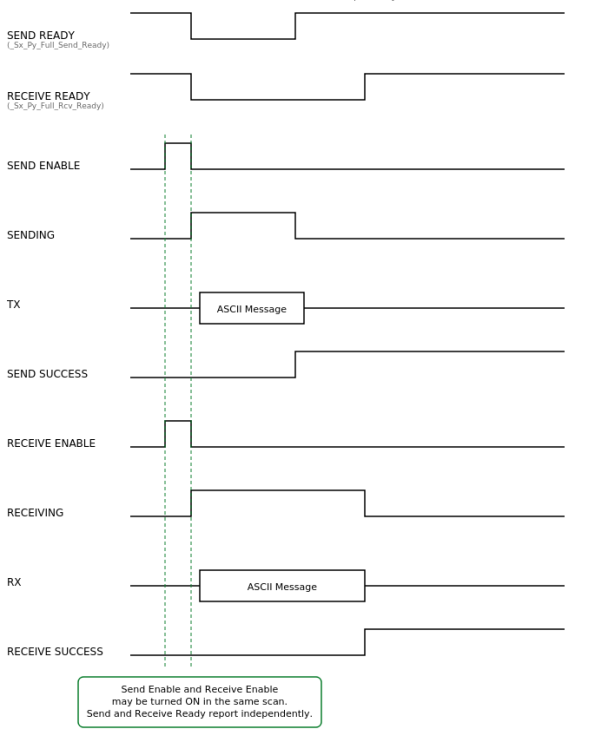
Using Full Duplex send and receive may be enabled in the same scan. Full Duplex reports Send Ready and Receive Ready separately for each port. Please refer to Full Duplex Timing Chart below.
|
|
Note: Port 1 on the CLICK Basic and Analog CPUs supports only the programming software and operator interfaces/HMI's. It does not support the Receive and Send instructions in a running program. Port 1 on the CLICK Ethernet and CLICK PLUS CPUs is an Ethernet port.
Note: Full Duplex is only supported on the C2-DCM when using the RS-232 port.
Note: For the Com Port wiring info, please refer to the CLICK PLC Hardware Manual or CLICK PLUS PLC Hardware Manual. |
|
To set up the Send and Receive instructions see links below: