Popup Window Frame
Shows a portion of another screen in the current screen: modal or modeless. Use it to access a group of controls without leaving the current window.
Example: On a main window with a process overview, you can place a popup window on each section of the main process to open individual panels showing details and basic controls for each subsection.
General Settings
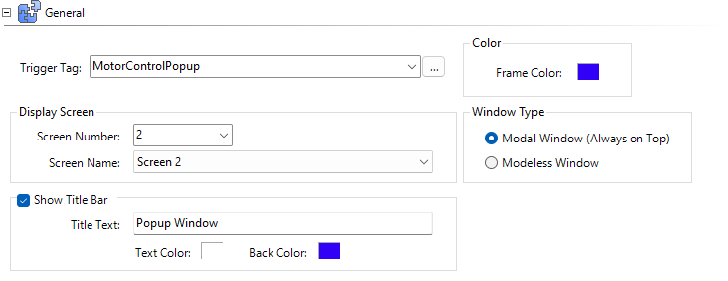
Trigger Tag
In the ON (1) state, the pop-up window appears. In the OFF (0) state, the pop-up window closes.
Display Screen
Displays this screen in the pop-up window. Most screens with pop-ups are dedicated screens since the size fits in the pop-up area. Any controls or display screens not inside the pop-up area do not load or display.
Window Type
Modal Window
Indicators and displays behind the modal continue to update, but buttons (including buttons to open the pop-up) will not function. To close the pop-up, you need a button on the pop-up to disable the trigger tag for the pop-up. Use one button on the main screen to Set On the trigger bit and a separate button on the pop-up to Set Off the trigger bit.
Modeless Window
A modeless window appears the same as a modal window, but buttons on the background screen continue to function so you can use a toggle button to open and close the pop-up.
Sizing
A pop-up window displays the top left portion of the display screen. To determine the size of the pop-up window:
-
Arrange all controls on the display screen toward the top left edge of the screen.
-
Place a square (polygon) on the display screen.
-
Position the square at Top=0 and Left=0 with the Property List.
-
Drag the bottom right handle to re-size the square so the square surrounds the display controls in the pop-up.
- Note the square width and height.
-
You can keep or delete the square now.
-
Add 25 pixels to the height of the pop-up and 2 pixels to the width of the square to allow for padding in the pop-up frame. If you turn off the Title Bar, you only need to add 2 pixels to the height as the Title Bar is 23 px tall.
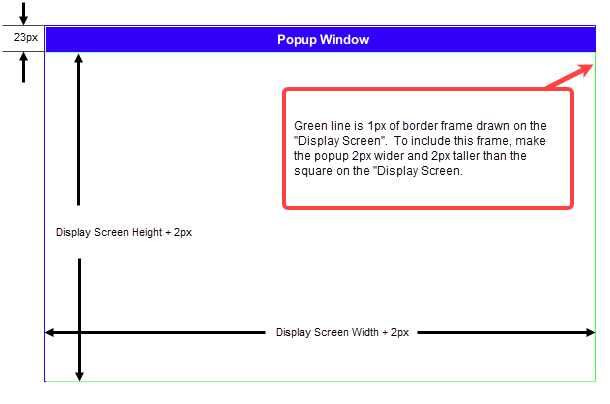
Popup Window Frame
CM186