GUI Errors |
Topic: CM469 |
The table shown below provides a list of possible C-more GUI (Graphical User Interface) errors in the C-more Programming Software. GUI errors are different than Object or Tag errors.
You may also see the error Message directly on your work area. For example, when working with Recipes, you may see an error Message like the one shown below.
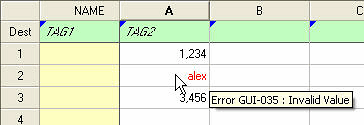
| Type | code | Message | Notes |
|---|---|---|---|
| Error | GUI-001 | Invalid project name | — |
| Error | GUI-002 | A folder or file doesn't exist | — |
| Error | GUI-003 | Target folder is not chosen | — |
| Error | GUI-004 | Cannot create | — |
| Error | GUI-005 | Input a file name | — |
| Error | GUI-006 | Save folder isn't set up | — |
| Error | GUI-007 | Select a device | — |
| Error | GUI-008 | There is no default printer currently selected | — |
| Error | GUI-009 | There is no effective printer | — |
| Error | GUI-010 | Failed to backup file copy | — |
| Error | GUI-011 | Please enter a positive integer | — |
| Error | GUI-012 | Please enter an integer between 3 and 100 | — |
| Error | GUI-013 | Please enter an integer | — |
| Error | GUI-014 | Please enter an integer between 25 and 400 | — |
| Error | GUI-015 | Screen No. is invalid. Input a value between 1 to 9999 | — |
| Error | GUI-016 | Selected screen No. has already been used | — |
| Error | GUI-017 | Type the screen | — |
| Error | GUI-018 | [screen] is background screen. Unable to delete. | — |
| Error | GUI-019 | Invalid screen number | — |
| Error | GUI-020 | Screen same cannot be empty | — |
| Error | GUI-021 | Invalid tag number | — |
| Error | GUI-022 | Type the screen | — |
| Error | GUI-023 | Number of characters must be even and valid range is 2 to 128 | — |
| Error | GUI-024 | Invalid address | — |
| Error | GUI-025 | Bit cannot be empty | — |
| Error | GUI-026 | Invalid bit address | — |
| Error | GUI-027 | Invalid Message number | — |
| Error | GUI-028 | Sound cannot be empty | — |
| Error | GUI-029 | Times must be between 1 and 10 | — |
| Error | GUI-030 | Length of Message should not exceed 200 characters including the embed commands | — |
| Error | GUI-031 | Invalid Alarm number | — |
| Error | GUI-032 | Define a valid tag for tag name | — |
| Error | GUI-033 | No action | — |
| Error | GUI-034 | Length of Message should not exceed 64 characters including the embed commands | — |
| Error | GUI-035 | Invalid Value | — |
| Error | GUI-037 | screen cannot be empty | — |
| Error | GUI-038 | Save file name cannot be empty | — |
| Error | GUI-039 | Length of Message should not exceed 256 characters including the embed commands | — |
| Error | GUI-040 | Select a send address | — |
| Error | GUI-041 | Length of Message should not exceed 400 characters including the embed commands | — |
| Error | GUI-042 | Name cannot be empty | — |
| Error | GUI-043 | Address cannot be empty | — |
| Error | GUI-044 | Invalid mail address | — |
| Error | GUI-045 | Cannot add duplicate entry | — |
| Error | GUI-046 | Server name cannot be empty | — |
| Error | GUI-047 | Address cannot be empt | — |
| Error | GUI-048 | ID cannot be empty | — |
| Error | GUI-049 | Test failed | — |
| Error | GUI-050 | The device name is blank, please enter device name | — |
| Error | GUI-051 | Device cannot be added | — |
| Error | GUI-052 | Protocol cannot be changed | — |
| Error | GUI-053 | Please enter an integer between 1 and 9999 | — |
| Error | GUI-054 | Please enter an integer between 1 and 1500 | — |
| Error | GUI-055 | Please enter an integer between 1 and 9 | — |
| Error | GUI-056 | Please enter an integer between 1 and 99 | — |
| Error | GUI-057 | Please enter an integer between 1 and 60 | — |
| Error | GUI-058 | Please enter an integer between 1 and 100 | — |
| Error | GUI-059 | Please enter an integer between 0 and 40 | — |
| Error | GUI-060 | Please enter an integer between 1 and 255 | — |
| Error | GUI-061 | Please enter an integer between 0 and 30000 | — |
| Error | GUI-062 | Please enter an integer between 0 and 31 | — |
| Error | GUI-063 | Please enter an integer between 1 and 90 | — |
| Error | GUI-064 | Please enter an integer between 1 and 247 | — |
| Error | GUI-065 | Either module name is empty or module ID is empty | — |
| Error | GUI-066 | Please enter an integer between 0 and 255 | — |
| Error | GUI-067 | Either module name is empty or IP address is empty | — |
| Error | GUI-068 | Either module name is empty or MAC address is empty | — |
| Error | GUI-069 | Please enter an integer between 0 and 10 | — |
| Error | GUI-070 | IP address is empty | — |
| Error | GUI-071 | Please enter an integer between 0 and 65535 | — |
| Error | GUI-072 | Please enter an integer between 0 and 255 | — |
| Error | GUI-073 | Please enter an integer between 1 and 250 | — |
| Error | GUI-074 | Please enter an integer between 1 and 248 | — |
| Error | GUI-075 | Please enter a number | — |
| Error | GUI-076 | Please enter a number between 0 and 4294967295 | — |
| Error | GUI-077 | Define a valid tag for password [number] | — |
| Error | GUI-078 | Panel name cannot be empty | — |
| Error | GUI-079 | Invalid panel name | — |
| Error | GUI-080 | IP address cannot be empty | — |
| Error | GUI-081 | Invalid IP address | — |
| Error | GUI-082 | Subnet mask cannot be empty | — |
| Error | GUI-083 | Invalid subnet mask | — |
| Error | GUI-084 | Invalid default gateway | — |
| Error | GUI-085 | Preferred DNS server cannot be empty | — |
| Error | GUI-086 | Invalid preferred DNS server | — |
| Error | GUI-087 | Invalid alternate DNS server | — |
| Error | GUI-088 | Port No. must be between 21 and 32767 | — |
| Error | GUI-089 | User restrictions must be between 1 and 10 | — |
| Error | GUI-090 | Account cannot be empty | — |
| Error | GUI-091 | Password cannot be empty | — |
| Error | GUI-093 | Memory type cannot be empty | — |
| Error | GUI-094 | Set up export screen | — |
| Error | GUI-095 | This field cannot be empty | — |
| Error | GUI-097 | Select a file to send | — |
| Error | GUI-098 | Select file to import | — |
| Error | GUI-099 | Select library | — |
| Error | GUI-100 | Failed to create the export file | — |
| Error | GUI-101 | Enter a valid path | — |
| Error | GUI-102 | Directory name cannot contain any of the following characters:\/:*?<>|." | — |
| Error | GUI-103 | Email address book is not configured | — |
| Error | GUI-104 | FTP services are not configured | — |
| Error | GUI-105 | Set the DNS server address | — |
| Error | GUI-106 | Minimum value is not within range | — |
| Error | GUI-107 | Maximum value is not within range | — |
| Error | GUI-108 | Minimum value is greater than or equal to maximum value | — |
| Error | GUI-109 | This action is associated with an E-mail or FTP. Unable to delete, | — |
| Error | GUI-110 | This device name already exists | — |
| Error | GUI-111 | Cannot set the panel station number as one of the device has the same station number | — |
| Error | GUI-112 | Adding this device will cause a change in the parity from even to odd in all the devices | — |
| Error | GUI-113 | At least one device is required | — |
| Error | GUI-114 | Invalid device name | — |
| Error | GUI-115 | The station number assigned to [station] already exists | — |
| Error | GUI-116 | The station number assigned to [station] cannot be same as the panel station number | — |
| Error | GUI-117 | The link number assigned to [station] already exists | — |
| Error | GUI-118 | Duplicate device name found, please select another one | — |
| Error | GUI-119 | Cannot add more than 64 devices | — |
| Error | GUI-120 | Invalid file extension. (valid extension is 'jpg') | — |
| Error | GUI-121 | Windows has returned an exception error. Windows exception code#: 0xXXXX message: [error message] process name: [process name] If issue continues, record the error code, message, process name, and what was happening at the time the error occurred. Contact technical support with this information. | — |
| Error | GUI-122 | Failed to create runtime file | — |
| Error | GUI-123 | Invalid screen | — |
| Error | GUI-124 | [Tag name] is associated with an object. Unable to delete. | — |
| Error | GUI-125 | This file is not in a recognizable format. [file name] | — |
| Error | GUI-126 | Limit exceeded. Object cannot be added to screen. | — |
| Error | GUI-127 | Selected project is protected | — |
| Error | GUI-128 | Select a folder | — |
| Error | GUI-130 | Selected screen No. cannot be used because it has been used as a background screen. | — |
| Error | GUI-131 | Type the object name | — |
| Error | GUI-132 | Failed to copy the file | — |
| Error | GUI-133 | Downloaded project is a protected project. This cannot be edited/viewed in the editor. | — |
| Error | GUI-134 | No project | — |
| Error | GUI-135 | Limit exceeded. Message cannot be added to database. | — |
| Error | GUI-136 | Please enter an integer between 0 and 101 | — |
| Error | GUI-137 | Address is not word aligned (even address is required) | — |
| Error | GUI-138 | Invalid server name | — |
| Error | GUI-139 | Some tags were not found. Please set the tag marked in red. | — |
| Error | GUI-140 | There is a line in which 'destination' does not exist | — |
| Error | GUI-141 | Destination and source datatype does not match | — |
| Error | GUI-142 | Value is not within range | — |
| Error | GUI-143 | Please enter a recipe sheet name | — |
| Error | GUI-144 | Destination tag does not exist | — |
| Error | GUI-145 | Data cannot be pasted because range does not match | — |
| Error | GUI-146 | Value Data cannot be copied to destination area. | — |
| Error | GUI-147 | Some parts of the Data are not pasted because the range of paste exceeds the limit | — |
| Error | GUI-148 | Data cannot be pasted because the range of copy and paste are different | — |
| Error | GUI-149 | Data cannot be pasted for read-only tags | — |
| Error | GUI-150 | Data cannot be pasted because source Data doesn't match with destination data | — |
| Error | GUI-151 | Tag is not found. Please set a tag. | — |
| Error | GUI-152 | Data cannot be pasted because area of copy and paste does are different | — |
| Error | GUI-153 | Values cannot be pasted in destination cells | — |
| Error | GUI-154 | Error reading file | — |
| Error | GUI-155 | Unsupported file version. [file name] | — |
| Error | GUI-156 | The empty is not admitted | — |
| Error | GUI-157 | Name cannot be empty | — |
| Error | GUI-158 | Object name is already used | — |
| Error | GUI-159 | Total number of trends objects logging Data exceeds the maximum of 16 | — |
| Error | GUI-170 | Invalid file name | — |
| Error | GUI-173 | Tag not found | — |
| Error | GUI-174 | Tag does not exist in the project | — |
| Error | GUI-175 | Screen cannot be added | — |
| Error | GUI-178 | Auto save error: verify that the location for auto save is valid | — |
| Error | GUI-179 | File does not contain any valid records. Refer to the table below for details on the possible causes of this error. | — |
| Error | GUI-180 | Tag name has more than 128 characters. Not able add the tag into the tag database. | — |
| Error | GUI-181 | The cell which is not blank cannot be shifted out of a sheet for preventing disappearance of data | — |
| Error | GUI-182 | Error(s) detected in cell(s). Do you want to save? | — |
| Error | GUI-183 | Data cannot be pasted because the format of copy and paste area are different | — |
| Error | GUI-184 | Error(s) detected in cell(s) | — |
| Error | GUI-185 | Import file is already opened, corrupted or invalid data. Please check the file and import again. Refer to the table below for details on the possible causes of this error. | — |
| Error | GUI-186 | The import file you selected contains multiple devices. You must select -default- or modify the import file to contain a single device. Refer to the table below for details on the possible causes of this error. | — |
| Error | GUI-187 | Port No. must be between 0 and 32767 | — |
| Error | GUI-188 | Duplicated port no.: [port no.] | — |
| Error | GUI-189 | Version mismatch | — |
| Error | GUI-190 | User restrictions must be between 1 and 5 | — |
| Warning | GUI-191 | The Web server must be enabled unless you have already installed the remote HMI console to your PC. Select the Web server tab to configure. | — |
| Warning | GUI-192 | The Web server must be enabled unless you have already installed the remote HMI console to your PC. Enable Web server in the Web server tab. | — |
| Error | GUI-193 | Number of characters valid range is 1 to 128 | — |
| Error | GUI-194 | Link name cannot be empty | — |
| Error | GUI-195 | Please enter an integer between 1 and 65535 | — |
| Error | GUI-196 | Please enter an integer between 0 and 5 | — |
| Error | GUI-197 | Duplicate link name | — |
| Error | GUI-198 | Please enter an integer between 1 and 30 | — |
| Error | GUI-199 | [Tag name] is associated with a password. Unable to delete. | — |
| Warning | GUI-200 | This project uses SD2 which is not available in the panel you have selected | — |
| Warning | GUI-201 | The external memory you selected, SD2, is not available in the panel selected for this project | — |
| Error | GUI-202 | [Port number] port no. is reserved by C-more system | — |
| Error | GUI-203 | %s is not found | — |
| Error | GUI-204 | *DH485 cannot be used on two ports at the same time | — |
| Error | GUI-205 | The formula is missing a value | — |
| Error | GUI-206 | The value entered is outside the range | — |
| Error | GUI-207 | There is no ")" corresponding to "(" in the formula | — |
| Error | GUI-208 | There is no "(" corresponding to ")" in the formula | — |
| Error | GUI-209 | Left value missing in formula | — |
| Error | GUI-210 | Right value missing in formula | — |
| Error | GUI-211 | Divide by zero is not allowed | — |
| Error | GUI-212 | Invalid comma (,) found in the formula | — |
| Error | GUI-213 | Invalid tag was found in the formula | — |
| Error | GUI-214 | Data type format does not match (HEX/Dec) in the formula | — |
| Error | GUI-215 | The formula is too long | — |
| Error | GUI-216 | The formula has an error | — |
| Error | GUI-217 | Invalid folder name | — |
| Error | GUI-218 | Please input a find word | Tag Name database search feature. |
| Error | GUI-219 | This name is reserved. Choose another name and try again. | — |
| Warning | GUI-220 | DO not save THIS project. tag import failed due to the error. Please close this project without saving and reopen the project. | May occur when you import a project if the tag database is corrupted. Do not save the project. Close the project and try the import again. If you save this project, the tag database might be permanently corrupted. |
| Warning | GUI-221 | You are pasting a pop-up window object to the screen it references | A pop-up window object cannot reference itself. Select a different screen. |
| Warning | GUI-222 | You are attempting to delete a screen referenced by a pop-up window object | — |
| Error | GUI-223 | Cannot refer to a screen when it is used on the background screen | Pop-up window object cannot refer to its own background screen. |
| Error | GUI-224 | Cannot refer to a screen on which the object is located | You have selected a screen for a pop-up window object that contains a pop-up window object using the present screen. This would cause a recursive error. |
| Error | GUI-225 | Referenced screen does not exist | — |
| Error | GUI-226 | Tag name has more than 128 characters. Not able add the tag into the tag database. | You cannot import a tag name with more than 128 characters to the recipe database. Shorten the tag name and import again. |
| Error | GUI-227 | Cannot access | The referenced network drive or external memory device not accessible. |
| Error | GUI-228 | The total length of folder name and file name should not exceed 128 characters | Event manager screen capture action folder name + file name cannot exceed 128 characters |
| Error | GUI-229 | Log cannot be added. Maximum 16 numbers of logs exceeded. | — |
| Error | GUI-230 | Log name already exist | — |
| Error | GUI-231 | Invalid log name | — |
| Error | GUI-232 | Please add a logging tag | — |
| Error | GUI-233 | Min. log interval value is greater than max. log interval value | — |
| Error | GUI-234 | Source can only contain characters specified in ISO-8859-1 | — |
| Warning | GUI-235 | Project is a non-native resolution with remote access enabled. This may cause remote access connection issues. | Running the project at a non-native resolution to the panel causes a heavy load on the processor and has an effect on the remote access communication integrity. |
| Error | GUI-236 | Total number of logging Data exceeds the maximum of 16 | — |
| Warning | GUI-237 | The same IP address is used for both [Ethernet port No.] and [Ethernet port No.] | — |
| Error | GUI-238 | The same network address is used for both [Ethernet port No.] and [Ethernet port No.]. | The built-in Ethernet port and EA-ECOM must have different network addresses. For example, 192.168.1.10 and 192.168.1.20 with a subnet mask of 255.255.255.0 both have the same network address of 192.168.1.0. Change one of the IP addresses so that the network addresses are different. |
| Warning | GUI-239 | The default gateway network address does not match the network address of any of the configured ports. | One of the Ethernet ports and the default gateway IP addresses must have the same network address. For Example: Ethernet port 1 IP address: 192.168.2.15 subnet mask: 255.255.255.0 default gateway: 192.168.2.1 network address is 192.168.2.0 for both which is a match. |
| Error | GUI-240 | Page title cannot be empty | — |
| Error | GUI-241 | File [library file] is not found | The path or files that the folder is pointing to does not exist. |
| Error | GUI-242 | Username cannot be empty | If User name and password have been enabled, you cannot leave these fields blank. |
| Warning | GUI-243 | The account settings will be changed as follows. Do you want to continue? | — |
| Warning | GUI-244 | The project being transferred is configured to allow the IP address of the panel to be changed from the software. For better Ethernet security it is recommended that this setting be disabled. To change this setting, go to Setup > panel network > security tab. Deselect 'enable IP address to be changed from software' for each Ethernet port. | — |
| Error | GUI-245 | The version [file name] firmware file was not found in [file path] | — |
| Warning | GUI-246 | This project uses USB2 or USB3 which is not available in the panel you have selected | — |
| Warning | GUI-247 | Port3 is assigned to a protocol. [model number] does not have a ort3 serial port. Please install the USB-485M USB to RS485 adapter. | — |
| Error | GUI-248 | The Date/Time tags cannot be reused in both the read and write configurations | — |
| Error | GUI-249 | Client ID cannot be empty | — |
| Error | GUI-250 | Topic cannot be empty | — |
| Error | GUI-251 | Payload cannot be empty | — |
| Error | GUI-252 | Please define a valid broker topic | — |
| Error | GUI-253 | No more broker topics can be registered. Choose from those already defined. | — |
| Error | GUI-254 | This broker topic already exists | — |
| Error | GUI-255 | This broker is used. Unable to delete. | — |
| Error | GUI-256 | Length of broker topic should not exceed 128 characters | — |
| Error | GUI-257 | Invalid link name. Some characters cannot be used. | — |
| Error | GUI-258 | Project files (.eap,.epp,.epp9) are not supported | — |
| Warning | GUI-259 | Allen-Bradley * DH485 protocol is not available | — |
| Error | GUI-260 | Number of characters must be even and valid range is 2 to 64 | — |
| Error | GUI-261 | Number of characters must be even and valid range is 2 to 260 | — |
| Error | GUI-262 | Key file is not selected | — |
| Error | GUI-263 | Client certificate file is not selected | — |
| Error | GUI-264 | Exception error : import failed | — |
| Error | GUI-265 | Cannot import because there is too much Data to import | — |
| Error | GUI-270 | Client ID cannot be empty | — |
| Error | GUI-271 | Duplicate Client ID found, please input another one | — |
| Error | GUI-272 | Panel has an older firmware version than software. However, The version [file name] firmware file was not found in [file path]. | — |
| Error | GUI-273 | A file with the same name exists and cannot be changed | — |
| Error | GUI-274 | The file name could not be changed | — |
| Error | GUI-275 | A folder with the same name exists and cannot be changed | — |
| Error | GUI-276 | The file name could not be changed | — |
| Error | GUI-277 | Contains an invalid string | — |
| Error | GUI-278 | Cannot write Data the log folder | — |
| Error | GUI-279 | There are no files available for download | — |
| Error | GUI-280 | Please select the file to download | — |
| Error | GUI-281 | There are no files available for upload | — |
| Warning | GUI-282 | The subnet addresses of the Ethernet ports overlap in range. Each network Interface must have a unique subnet range. [port name] and [port name]. | — |
| Error | GUI-283 | The C-more panel Type in the project does not match the connected panel type.\nChange the panel type in the panel Manager of the project or connect to the correct panel type. | — |
| Error | GUI-284 | When in define keypad mode, it is not possible to add from the screen library to the project | — |
| Error | GUI-285 | The firmware update cannot be performed because the connected panel does not support this firmware | — |
| Import File Errors | ||||||||||
|---|---|---|---|---|---|---|---|---|---|---|
| Error ID | Import file Type | |||||||||
| Recipe .csv | MSG.xls | Event.xls | Language | FTP.xls | FTP .csv | Mail.xls | Mail .csv | Tag.xls | Tag .csv | |
| GUI-179 | — | File does not contain any records | The file is empty | |||||||
| GUI-185 | The file is missing a name column | The file is empty—OR—The file is open in another application—OR—The file is missing a column | The file is missing either the title or the event column | The file is open in another application—OR—The file is missing a column—OR— The file is missing a title | The file is open in another application—OR—The file is missing a column—OR— The file is missing a title | The file is missing a column | The file is open in another application—OR—The file is missing a column | The file is missing a Protocol ID column | ||
| GUI-186 | — | Multiple registered devices but one device is selected | ||||||||
*
|
|
Note: The DH485 driver is for legacy systems. It is not supported in Series CM5 or later. Series EA9 currently supports this driver. The following errors are generated from the designated PLC, monitored by the C-more panel, and displayed on the panel screen if active. Refer to the PLC manufacturer's documentation for additional and up-to-date information. |
